<?xml version="1.0" encoding="utf-8"?>
<feed xmlns="http://www.w3.org/2005/Atom">

  <title><![CDATA[Oneiroi]]></title>
  <link href="http://blog.oneiroi.co.uk/atom.xml" rel="self"/>
  <link href="http://blog.oneiroi.co.uk/"/>
  <updated>2012-12-19T11:36:19+00:00</updated>
  <id>http://blog.oneiroi.co.uk/</id>
  <author>
    <name><![CDATA[David Busby]]></name>
    <email><![CDATA[d.busby@oneiroi.co.uk]]></email>
  </author>
  <generator uri="http://octopress.org/">Octopress</generator>

  
  <entry>
    <title type="html"><![CDATA[Openstack - Deploying Windows 8]]></title>
    <link href="http://blog.oneiroi.co.uk/openstack/windows8/windows/kvm/virtio/openstack-deploying-windows-8/"/>
    <updated>2012-12-18T19:36:00+00:00</updated>
    <id>http://blog.oneiroi.co.uk/openstack/windows8/windows/kvm/virtio/openstack-deploying-windows-8</id>
    <content type="html"><![CDATA[<p>Despite a never ending well of hate for windows, sometimes I have to work with it.</p>

<p>In this case I needed to create a glance image that could be deployed to a openstack cluster &#8230; and that is where the fun stops.</p>

<p>First things first, if you can do a clean install (if you paid the extra £20 and actually received your dvd media that is!) do so, the upgrade process from Windows 7 took the best part of 2 days to complete.</p>

<p>Secondly to create your glance image you&#8217;re going to have to do the installation on the same type of hypervisor that you have openstack running upon, in this case I will be covering deployment of Windows 8 onto Linux KVM with virtio drivers.</p>

<h2>The kludge</h2>


<p>You can not start the instance using virtio for the hard disk, it simply puts itself into a never ending recovery mode, instead set the bus type to SATA or IDE.</p>

<p>Attach a second drive that uses virtio bus, why you may ask? Windows 8 will now boot and in turn have a device attached which it can not recognize.</p>

<p>Before booting you will also need to attach <a href="http://alt.fedoraproject.org/pub/alt/virtio-win/latest/images/bin/">this iso</a> as a cdrom, at the time of writing you can use the Win7 drivers for Windows 8. (iso version 0.1-30)</p>

<h2>Square peg, round hole == Bigger hammer</h2>


<p>I opted to first install all the drivers by opening up the virtual cdrom, navigating to the Win7 folder and: right click -> install on all the &#8220;Setup Information&#8221; files.</p>

<p>My &#8220;fun&#8221; did not end here however &#8230; because it would appear the attached virtio device was not formatted Windows8 decided to ignore it.</p>

<p>In this case the device manager needs to be launched to resolve the issue a laborious task in itelf.</p>

<ol>
<li>Open desktop, and click the windows explorer tray icon.</li>
<li>Right click &#8220;Computer&#8221; and click properties.</li>
<li>Click &#8220;Device Manager&#8221;.</li>
<li>Expand the &#8220;Disk Drives&#8221; section, (if you did not install the drivers and reboot, you may be prompted to install the device, or it will show up as an unknown device instead of a disk drive)</li>
<li>Right click properties on the &#8220;RedHat VirtIO SCSI Device&#8221;</li>
<li>Click the volumes tab and click populate.</li>
<li>Close all windows leaving the Explorer window open.</li>
<li>Right click computer, select Manage.</li>
<li>Select disk management, partition and format the Virtio device as you would any other hard drive.</li>
<li>You should now have a new volume, this is running with the virtio drivers.</li>
<li>Shutdown windows.</li>
<li>Reconfigure the KVM instance, remove the VirtIO disk, change the primary disk bus to VirtIO</li>
<li>Start windows, and wait &#8230; and wait &#8230;</li>
<li>Once the start menu has booted you will begin to notice performance picks up after a while, I assume this is due to background tasks running.</li>
<li>Run any updates that may be outstanding and shutdown the instance. I would also advise <a href="http://www.guidingtech.com/13469/hot-to-enable-remote-desktop-in-windows-8/">configuring remove desktop</a></li>
<li>Convert to qcow2 (if you want), and import into glance as you would any other image.</li>
<li>Create or modify a <a href="http://docs.openstack.org/essex/openstack-compute/starter/content/Security_Overview-d1e2505.html">security group</a> if you have opted to allow Remote Desktop.</li>
</ol>


<p>And boot the image as normal, ensuring that the selected &#8220;flavor&#8221; has enough disk space to start the instance.</p>

<p>As for meta data injection, for say account setup I have no idea at this time, please feel free to post in the comment or email me with methods for doing so.</p>

<h2>Credits</h2>


<p><a href="http://cloud101.eu/blog/2012/05/31/how-to-create-a-windows-2008-r2-image-for-openstack-with-virtio-support/">this blog</a> for noting the &#8216;dirty hack&#8217; workaround in Windows 8 R2</p>

<p>and <a href="http://twitter.com/parters">James P</a> for having way more patience with windows than I will ever have.</p>
]]></content>
  </entry>
  
  <entry>
    <title type="html"><![CDATA[Openssl unable to load certificate wrong asn1 encoding routines:ASN1_CHECK_TLEN::tag:tasn_dec.c:1319]]></title>
    <link href="http://blog.oneiroi.co.uk/openssl/x.509/pcks7/openssl-unable-to-load-certificate-wrong-asn1-encoding-routines-asn1-check-tlen-tag-tasn-dec-dot-c-1319/"/>
    <updated>2012-08-10T11:13:00+01:00</updated>
    <id>http://blog.oneiroi.co.uk/openssl/x.509/pcks7/openssl-unable-to-load-certificate-wrong-asn1-encoding-routines-asn1-check-tlen-tag-tasn-dec-dot-c-1319</id>
    <content type="html"><![CDATA[<p>If you come across this error</p>

<p><code>
unable to load certificate
140735207381436:error:0D0680A8:asn1 encoding routines:ASN1_CHECK_TLEN:wrong tag:tasn_dec.c:1319:
140735207381436:error:0D07803A:asn1 encoding routines:ASN1_ITEM_EX_D2I:nested asn1 error:tasn_dec.c:381:Type=X509_CINF
140735207381436:error:0D08303A:asn1 encoding routines:ASN1_TEMPLATE_NOEXP_D2I:nested asn1 error:tasn_dec.c:751:Field=cert_info, Type=X509
140735207381436:error:0906700D:PEM routines:PEM_ASN1_read_bio:ASN1 lib:pem_oth.c:83:
</code></p>

<p>When trying to validate a certificate using openssl, this is because it is in the wrong format, whilst the certificate file visually appears to be in x.509 format, you will find it contains a far longer base64 string than x.509 certificats of the same bit length.</p>

<p>The format in this case is p7b (PCKS #7); to use the certificate witih apache you&#8217;re going to have to convert this.</p>

<p><code>
openssl pkcs7 -print_certs -in certificate.p7b -out certificate.cer
</code></p>

<p>Within the resulting .cer file you will file you x.509 certificate bundled with relevant CA certificates, break these out into your relevant .crt and ca.crt files and load as normal into apache.</p>
]]></content>
  </entry>
  
  <entry>
    <title type="html"><![CDATA[Percona XtraDB Cluster - Prototyping with Openstack]]></title>
    <link href="http://blog.oneiroi.co.uk/percona/xtradb/cluster/openstack/percona-xtradb-cluster-prototyping-with-openstack/"/>
    <updated>2012-08-09T13:38:00+01:00</updated>
    <id>http://blog.oneiroi.co.uk/percona/xtradb/cluster/openstack/percona-xtradb-cluster-prototyping-with-openstack</id>
    <content type="html"><![CDATA[<p>Per my <a href="https://plus.google.com/u/1/117561367404774597588">Google+</a> ramblings; recently I began experimenting with <a href="http://www.percona.com/software/percona-xtradb-cluster/">Percona XtraDB Cluster</a>.</p>

<p>After an initial read the setup process <a href="https://plus.google.com/117561367404774597588/posts/YjLkYkMJRvN">seemed very simple</a>, and as it would turn out it was; I later moved onto some simple <a href="https://plus.google.com/117561367404774597588/posts/ZqLVySmp5kn">resillience testing</a> of my 4 node p.o.c. cluster.</p>

<p>I&#8217;m still a little unsure on the <a href="http://serverfault.com/questions/403104/percona-xtradb-cluster-node-recovery/403118">circular topology</a> I ended up using; but it appears absolutely fine so long as the following conditions are met.</p>

<ol>
<li>At least one node is always available.</li>
<li>Nodes are recovered only if their peer is available to sync from.
 a. Requiring a startup order.</li>
</ol>


<p>This is not such a bad thing, as if all nodes were to suddenly go down; I can&#8217;t think of a situation where you would want it all to recover &#8220;automagically&#8221; you would want to inspect to ensure data integrity and recover from a &#8220;known good&#8221; version of your data.</p>

<p><strong>Openstack as an experimentation platform</strong></p>

<p><a href="http://openstack.org">Openstack</a> i I&#8217;ve found perfect for rapid prototyping of hostinsg platform architectures, in none geek building virtual models of servers and services; ensuring sure they all go together properly before committing to the build plan.</p>

<p>The best part being the VM&#8217;s are &#8220;Throw away&#8221;, something goes inexplicably wrong with a vm prototype? assuming you used snapshots at each step it&#8217;s easy enough to roll back.</p>

<p>For reference I used Fedora 17 and the <a href="http://fedoraproject.org/wiki/Getting_started_with_OpenStack_on_Fedora_17">wiki reference setup</a> of openstack for prototyping.</p>

<p>Note in this case you may be better off using <a href="http://wiki.openvz.org/Main_Page">OpenVZ</a>; whilst openstack does not at the time of writing support this directly, the openstack DBaaS (Database as a Service) project <a href="http://wiki.openstack.org/DatabaseAsAService">Red Dwarf</a> leverages OpenVZ to provide DBaaS, (Something I&#8217;d like to get auto handeling clusters via XtraDB clustering, given the time &#8230;).</p>

<p><strong>XtraDB cluster p.o.c. platform</strong></p>

<p>My platform consists of 4 nodes; although I am sured <a href="http://serverfault.com/questions/403104/percona-xtradb-cluster-node-recovery/403118">an odd number</a> of nodes is preferable to reduce the risk of split-brain behaviour occuring.</p>
]]></content>
  </entry>
  
  <entry>
    <title type="html"><![CDATA[Cloaking your Web Apps - The Stealth Engine X]]></title>
    <link href="http://blog.oneiroi.co.uk/hacking/linux/security/nginx/cloaking-your-web-apps-the-stealth-engine-x/"/>
    <updated>2012-07-05T12:52:00+01:00</updated>
    <id>http://blog.oneiroi.co.uk/hacking/linux/security/nginx/cloaking-your-web-apps-the-stealth-engine-x</id>
    <content type="html"><![CDATA[<p>Following on from <a href="http://blog.oneiroi.co.uk/hacking/linux/security/cloaking-your-web-apps-the-hooded-apache/">The Hooded Apache</a>, I thought it was about time to cover Nginx configuration.</p>

<p>Nginx <a href="http://web.nvd.nist.gov/view/vuln/defail?vulnId=CVE-2012-2089">is not exempt from security issues</a>, and as with apache certain versions can vulnerable to a specific attack, as such the first line of defense is you hide your nginx version.</p>

<p>This can be done via:</p>

<figure class='code'><div class="highlight"><table><tr><td class="gutter"><pre class="line-numbers"><span class='line-number'>1</span>
<span class='line-number'>2</span>
<span class='line-number'>3</span>
<span class='line-number'>4</span>
</pre></td><td class='code'><pre><code class=''><span class='line'>server {
</span><span class='line'>    server_tokens off;
</span><span class='line'>    ...
</span><span class='line'>}</span></code></pre></td></tr></table></div></figure>


<p>This changes the put from</p>

<figure class='code'><div class="highlight"><table><tr><td class="gutter"><pre class="line-numbers"><span class='line-number'>1</span>
</pre></td><td class='code'><pre><code class=''><span class='line'>Server: nginx/1.0.12</span></code></pre></td></tr></table></div></figure>


<p>To</p>

<figure class='code'><div class="highlight"><table><tr><td class="gutter"><pre class="line-numbers"><span class='line-number'>1</span>
</pre></td><td class='code'><pre><code class=''><span class='line'>Server: nginx</span></code></pre></td></tr></table></div></figure>


<p>You could if you are so inclined change the server string in the c code itself</p>

<p>src/http/ngx_http_header_filter_module.c</p>

<div class="highlight"><pre><code class="c"><span class="p">...</span>
<span class="k">static</span> <span class="kt">char</span> <span class="n">ngx_http_server_string</span><span class="p">[]</span> <span class="o">=</span> <span class="s">&quot;Server: my_modified_server&quot;</span> <span class="n">CRLF</span><span class="p">;</span>
<span class="k">static</span> <span class="kt">char</span> <span class="n">ngx_http_server_full_string</span><span class="p">[]</span> <span class="o">=</span> <span class="s">&quot;Server: my_modified_server/release_version&quot;</span> <span class="n">CRLF</span><span class="p">;</span>
<span class="p">...</span>
</code></pre>
</div>


<p><strong>To err is human &#8230;</strong></p>

<p>Sometimes standard responses can be used for service fingerprinting as such error documents could still give away your running server version even if you were to edit the header code as per above, again this <em>could</em> be done by modifying the C code to only return &#8220;&#8221; for each error page, in which case you will need to edit</p>

<p>src/http/ngx_http_special_response.c</p>

<div class="highlight"><pre><code class="c"><span class="p">...</span>
<span class="k">static</span> <span class="kt">char</span> <span class="n">ngx_http_error_301_page</span><span class="p">[]</span> <span class="o">=</span> <span class="s">&quot;&quot;</span><span class="p">;</span>
</code></pre>
</div>


<p>I&#8217;m not going to list all of them you should get the idea from the exmaple above; however this is not really required, you can also swap out the default error pages with standard configuration.</p>

<figure class='code'><div class="highlight"><table><tr><td class="gutter"><pre class="line-numbers"><span class='line-number'>1</span>
</pre></td><td class='code'><pre><code class=''><span class='line'>error_page 404 = /path/to/custom/404.html;</span></code></pre></td></tr></table></div></figure>


<p><strong> A strong Front &#8230; </strong></p>

<p>Nginx ofetn gets used to proxy other services, as such you could be revealing the backend technologies in use due to the backend server sending headers such as X-Powered-By.</p>

<p>This where in your proxy configure options you can have nginx intercept and remove the headers being sent by the backend.</p>

<figure class='code'><div class="highlight"><table><tr><td class="gutter"><pre class="line-numbers"><span class='line-number'>1</span>
</pre></td><td class='code'><pre><code class=''><span class='line'>proxy_hide_headers X-Powered-By;</span></code></pre></td></tr></table></div></figure>


]]></content>
  </entry>
  
  <entry>
    <title type="html"><![CDATA[KVM Linux - expanding a guest LVM file system using virt-resize]]></title>
    <link href="http://blog.oneiroi.co.uk/linux/kvm/virt-resize/RHEL/LVM/kvm-linux-expanding-a-lvm-guest-file-system-using-virt-resize/"/>
    <updated>2012-07-02T12:14:00+01:00</updated>
    <id>http://blog.oneiroi.co.uk/linux/kvm/virt-resize/RHEL/LVM/kvm-linux-expanding-a-lvm-guest-file-system-using-virt-resize</id>
    <content type="html"><![CDATA[<p>In this post I will cover growing the file system of a guest instance when running KVM linux.</p>

<p>For this you will require the following Packages:</p>

<ol>
<li>libguestfs-tools</li>
<li>guestfish</li>
</ol>


<p><strong>Shutdown the instance</strong></p>

<p>In order to grow the disk we must virsh shutdown the instance, this can be achieved using a simple <code>virsh shutdown instance_name</code>, try to avoid running a virsh destroy as we want a clean filesystem to avoid issues in the resize.</p>

<p><strong> Get current image information</strong></p>

<p>After the image has shutdown we can now go ahead and get some information on the disk configuration:</p>

<figure class='code'><div class="highlight"><table><tr><td class="gutter"><pre class="line-numbers"><span class='line-number'>1</span>
<span class='line-number'>2</span>
<span class='line-number'>3</span>
<span class='line-number'>4</span>
<span class='line-number'>5</span>
<span class='line-number'>6</span>
</pre></td><td class='code'><pre><code class=''><span class='line'>virt-filesystems --long --parts --blkdevs -h -a centos_centos6.qcow2
</span><span class='line'>
</span><span class='line'>Name       Type       Size  Parent
</span><span class='line'>/dev/sda1  partition  200M  /dev/sda
</span><span class='line'>/dev/sda2  partition  9.8G  /dev/sda
</span><span class='line'>/dev/sda   device     10G   -
</span></code></pre></td></tr></table></div></figure>


<p>As can be seen here there is a single 10GB virtual disk residing on /dev/sda</p>

<p><strong>virt-rezise</strong></p>

<p>We must then create a destination disk image, of the required total size</p>

<figure class='code'><div class="highlight"><table><tr><td class="gutter"><pre class="line-numbers"><span class='line-number'>1</span>
</pre></td><td class='code'><pre><code class=''><span class='line'>qemu-img create -f qcow2 outfile 150G</span></code></pre></td></tr></table></div></figure>


<p>I have opted to use the &#8211;expand flag, if this is not specified a new partition is created to ocupy the free space, refer to <code>man virt-resize</code> for more advanced options such as splitting the freespace to grow existing partitions (i.e. expand the boot partition +100M)</p>

<figure class='code'><div class="highlight"><table><tr><td class="gutter"><pre class="line-numbers"><span class='line-number'>1</span>
</pre></td><td class='code'><pre><code class=''><span class='line'>virt-resize --expand /dev/sda2 original.qcow2 outfile.qcow2</span></code></pre></td></tr></table></div></figure>


<p>Go make a coffee as this step will take a while to complete.</p>

<p><strong>Finishing up</strong></p>

<p>If you were to start the instance back up now using outfile.qcow2 as the disk image, you would find the OS reports the original disk size, this is due to the LVM configuration which we can not change &#8220;online&#8221; (unless of course you are changing a partition that can be unmounted, not the case here).</p>

<p>We will use guestfish to complete the process.</p>

<figure class='code'><div class="highlight"><table><tr><td class="gutter"><pre class="line-numbers"><span class='line-number'>1</span>
<span class='line-number'>2</span>
<span class='line-number'>3</span>
<span class='line-number'>4</span>
<span class='line-number'>5</span>
<span class='line-number'>6</span>
<span class='line-number'>7</span>
<span class='line-number'>8</span>
<span class='line-number'>9</span>
<span class='line-number'>10</span>
<span class='line-number'>11</span>
<span class='line-number'>12</span>
<span class='line-number'>13</span>
<span class='line-number'>14</span>
<span class='line-number'>15</span>
<span class='line-number'>16</span>
<span class='line-number'>17</span>
<span class='line-number'>18</span>
<span class='line-number'>19</span>
<span class='line-number'>20</span>
<span class='line-number'>21</span>
<span class='line-number'>22</span>
<span class='line-number'>23</span>
<span class='line-number'>24</span>
</pre></td><td class='code'><pre><code class=''><span class='line'>guestfish --rw -a outfile.qcow2
</span><span class='line'>
</span><span class='line'>Welcome to guestfish, the libguestfs filesystem interactive shell for
</span><span class='line'>editing virtual machine filesystems.
</span><span class='line'>
</span><span class='line'>Type: 'help' for help on commands
</span><span class='line'>      'man' to read the manual
</span><span class='line'>      'quit' to quit the shell
</span><span class='line'>
</span><span class='line'>&gt;&lt;fs&gt; run
</span><span class='line'>&gt;&lt;fs&gt; list-filesystems
</span><span class='line'>/dev/vda1: ext4
</span><span class='line'>/dev/VolGroup00/LogVol00: ext4
</span><span class='line'>/dev/VolGroup00/LogVol01: swap
</span><span class='line'>&gt;&lt;fs&gt; lvresize-free /dev/VolGroup00/LogVol00 100
</span><span class='line'>&gt;&lt;fs&gt; resize2fs /dev/VolGroup00/LogVol00
</span><span class='line'>&gt;&lt;fs&gt; e2fsck-f /dev/VolGroup00/LogVol00
</span><span class='line'>&gt;&lt;fs&gt; exit
</span><span class='line'>
</span><span class='line'>virt-df -h outfile.qcow2
</span><span class='line'>Filesystem                                Size       Used  Available  Use%
</span><span class='line'>centos_el6_php53_lap:/dev/sda1            194M        52M       132M   27%
</span><span class='line'>centos_el6_php53_lap:/dev/VolGroup00/LogVol00
</span><span class='line'>                                          146G       1.1G       137G    1%
</span></code></pre></td></tr></table></div></figure>


<p>Your lvm configuration may differ change the above according to the output from list-filesystems.</p>

<p>Note: I run e2fsck-f as a precaution, this is not a required step though I highly recomend doing this.</p>

<p>Now finally swap out the images (or update the libvirt xml file, it&#8217;s up to you)</p>

<figure class='code'><div class="highlight"><table><tr><td class="gutter"><pre class="line-numbers"><span class='line-number'>1</span>
<span class='line-number'>2</span>
<span class='line-number'>3</span>
</pre></td><td class='code'><pre><code class=''><span class='line'>mv ./original.qcow2 ./original.bak
</span><span class='line'>mv ./outfile.qcow2 ./original.qcow2
</span><span class='line'>virsh start instance_name</span></code></pre></td></tr></table></div></figure>


<p>If you instance starts successfully and all your data is intact the original.bak can be safely removed.</p>
]]></content>
  </entry>
  
  <entry>
    <title type="html"><![CDATA[Baking a pwnberry pi]]></title>
    <link href="http://blog.oneiroi.co.uk/linux/raspi/security/pentesting/netsec/baking-a-pwnberry-pi/"/>
    <updated>2012-06-29T12:54:00+01:00</updated>
    <id>http://blog.oneiroi.co.uk/linux/raspi/security/pentesting/netsec/baking-a-pwnberry-pi</id>
    <content type="html"><![CDATA[<p>Earlier in the month I made reference in my Google+ posting that I had begun prototyping a pentesting &#8220;drop box&#8221; using the (Raspberry Pi)[http://www.raspberrypi.org] as the brains.</p>

<p>This is now 19 days since, and I realised I had not gotten around to writing a blog post on the project.</p>

<p><strong>The Problem</strong></p>

<p>The general public are unaware just how much data they send/receive at any given time; especially if said person has a &#8220;smart phone&#8221; the wealth of personal data a person carries around in their pocket can be staggering; more so that they have absolutely no clue how bad that can potentially be.</p>

<p>Want to carry out a little experiment?</p>

<ol>
<li>Gather some none netsec aware people</li>
<li>How many of them can tell you right now without looking, if their phones wifi is enabled?</li>
<li>How many can do the same for bluetooth?</li>
<li>Without giving details, how many have passwords / bank details / something that shoudln&#8217;t be on their phone; on their phone?</li>
</ol>


<p>You&#8217;ll be concerned with the results (unless you have somehow found a random grouping of people completely aware of their phones function and content at all times &#8230;).</p>

<p><strong>Bridging the gap</strong></p>

<p>In my experience no matter how you phrase it; for the general end consumer any conversation on netsec is met with indifference mainly due to a lack of understanding which is frustrating to say the least.</p>

<p>However you can can two directions in this situation berate the stupid luser; or you can attempt to educate them, and to that effect the most successfull method is something visual, in the form of a practical demonstration of the point you are trying to get across.</p>

<p>Why? It removes the need for the end consumer to attempt to mentally visualise what you are describing; all puns aside this makes it far easier for the end consumer to understand.</p>

<p><strong>Education, got it &#8230; so why the pi?</strong></p>

<p>Simple really, inexpensive 600MHZ arm processor that can boot linux and run from a battery pack.</p>

<p> The peak consumption I read somewhere is around 700ma, the battery pack in question is a 5000maH which asusming we see a 60% return on a full charge equestes to roughly 4.5hrs run time total.</p>

<ol>
<li>Low power consumption</li>
<li>Easily portable</li>
<li>Relativly inexpensive</li>
<li>Runs linux</li>
</ol>


<p><strong>The Concept</strong></p>

<p>I&#8217;d like to assume if you are reading this, you have at least a basic knowledge of netsec so at this point the post becomes less end user friendly &#8230;</p>

<ol>
<li>Jassegar - utilizing jassegar to masquerade as a trusted ap, and route traffic through ethernet / usb 3g dongle.
 a. Desposable - setup and go, access data over 3g connection via a reverse tunnel; remote wipe / destruction.</li>
<li>Karma - I don&#8217;t know much about the karma quite, it appears this can be used for much the same as jassegar.</li>
</ol>


<p>Couple the above with airdrop-ng for active denial of all wifi in the area, and suddenly every smart phone / laptop in the area is routing via the pwnberry pi and NO ONE is the wiser.</p>

<p><strong>Proof or STFU</strong></p>

<p>Whilst I don&#8217;t have a working demo at this time, perhaps some photos of the &#8220;build&#8221; would suffice?</p>

<p><img src="http://blog.oneiroi.co.uk/images/pwnberry-ingredients.jpg"></p>

<p>Running left to right:</p>

<ol>
<li>SD Card</li>
<li>5000maH usb battery</li>
<li>Bottom of the &#8220;weather proof box&#8221;</li>
<li>Raspberry PI</li>
<li>ALFA awus036nh</li>
</ol>


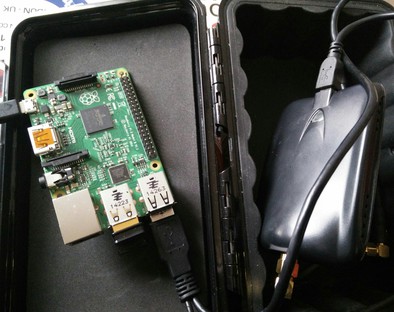
<p><img src="http://blog.oneiroi.co.uk/images/pwnberrypi-weatherproof-box.jpg"></p>

<p>All boxed in the &#8220;Premium&#8221; container, aka rubber sealed tupperware of doom &#8230;</p>

<p><strong>To come &#8230;</strong></p>

<p>I&#8217;m trying out different distributions to achieve this, pwnpi is looking promising at the moment.</p>

<p>As always time is limited so it&#8217;s on an as / when basis.</p>
]]></content>
  </entry>
  
  <entry>
    <title type="html"><![CDATA[Embracing the cloud]]></title>
    <link href="http://blog.oneiroi.co.uk/cloud/clouddns/cloudfiles/embracing-the-cloud/"/>
    <updated>2012-06-20T21:07:00+01:00</updated>
    <id>http://blog.oneiroi.co.uk/cloud/clouddns/cloudfiles/embracing-the-cloud</id>
    <content type="html"><![CDATA[<p>Yeh yeh &#8230; so it is true I have some quite <a href="http://saiweb.co.uk/hosting/cloud-hosting-my-views/">vocal opinions</a>, on all this cloud marketing fluff.</p>

<p>That said it has some great potential, if you&#8217;ve been following my open source contributions and posts you&#8217;ll known I have an special affinity for <a href="http://openstack.org">Openstack</a>, <a href="http://aeolusproject.org/">Aeolus</a>, and of course <a href="http://opennebula.org/">Opennebula</a>.</p>

<p>As such I&#8217;ve taken to jumping in &#8220;feet first&#8221;, what better way eh?</p>

<p>Last October I was fortunate enough to attend the Openstack training in London, hosted by <a href="http://rackspace.com">Rackspace</a>, recently I now have a full openstack deployment running on fedora 17 on my laptop for prototyping, and testing (I have of course been bugreporting to redhat bugzilla! and I encourage you to do the same!).</p>

<p>I met some great people on the course last October, which unfortunatly I&#8217;ve only managed to keep in contact with a few of (if you&#8217;re reading this and were there get in contact!).</p>

<p>I have some upstream commits for: EPEL Openstack, libcloud, aeolus, boxgrinder &#8230; and I&#8217;ve gotten to a point this year where I can reflect, and make a post to that effect.</p>

<p>In short I have one problem with the cloud, and that&#8217;s the marketing; let me explain why, marketing is driven to make sales, it does not care about the education of the end user as to the product they are paying for, (and frankly hearing my parents / clients ask &#8220;Can&#8217;t you just use the cloud?&#8221; makes me want to break out the beating stick of education, more for the marketing people I belive in making a solution right for the indvidual not for the bottom line&#8230;), as I&#8217;ve come to know more on the systems involved it&#8217;s a revolution, now calm down and let me explain.</p>

<p>Yes the cloud is simply virtualization if you break it down into it&#8217;s rawest form, and that has been around for decades &#8230; but what &#8220;the cloud&#8221; is doing despite the marketing fluff, is comoditizing the technology and plating it firmly in the hands of users who have little to no technical background or knowlege, why is this a revolution?</p>

<p>Inherently a person who is somewhat intellegent is curious, curiosity (Despite killing the cat, though if my neighbours cat craps in my garden again it may well be my boot and not the curioisity) leads to discovery, this inturn leads to understanding; putting something so powerful so simply within reach of those who do not understand the technology both increases it&#8217;s proftiablity and should said end user persue their curosity they will learn.</p>

<p>Right so education for the massses, what&#8217;s next hugging trees?
Not quiet the you may be missing the point, what&#8217;s better than an educated client someone who knows what they want and the potential technologies to achieve it as apposed to the uneducated who take the line of &#8220;it can&#8217;t be that hard all you do is sit there and tap the keyboard all day&#8221;.</p>

<p>There is a very real gap in understanding between the end user, and the Sysadmin/Devops supporting it, the cloud may well help to bridge the gap between the technology and the user, such as Devops bridges the gap between operations and the developer.</p>

<p>So, pulling this back to the original point of this blog, I appear to have gone off at a tangent.</p>

<ol>
<li>I&#8217;ve conveted Wordpress -> Jekyll + Octopress</li>
<li>I&#8217;ve worked on the Rakefile to push differing assets to cloudfiles/</li>
<li>I am now just waiting on clouddns to allow CNAME records for the main domain, then &#8230;</li>
<li>saiweb.co.uk will exist purely in cdn.</li>
</ol>


<p>With any luck I will be the first but this is reliant on the dns options becomming available, please comment and let me know your thoughts!</p>
]]></content>
  </entry>
  
  <entry>
    <title type="html"><![CDATA[RHEL 6 Openstack via EPEL Keystone installation and integration with Nova and Glance]]></title>
    <link href="http://blog.oneiroi.co.uk/openstack/rhel-6-openstack-via-epel-keystone-installation-and-integration-with-nova-and-glance/"/>
    <updated>2012-04-22T16:04:00+01:00</updated>
    <id>http://blog.oneiroi.co.uk/openstack/rhel-6-openstack-via-epel-keystone-installation-and-integration-with-nova-and-glance</id>
    <content type="html"><![CDATA[<p><img src="http://blog.oneiroi.co.uk/openstack-cloud-software-vertical-small.png"></p>

<p>In this post I follow on from <a href="http://saiweb.co.uk/openstack/rhel-6-openstack-via-epel-nova-and-glance-on-kvm/">Setting up Nova and Glance</a>, and now moving installing and Integrating keystone.
I&#8217;d first like to <a href="https://www.ibm.com/developerworks/mydeveloperworks/wikis/home/wiki/OpenStack?lang=en#configure-nova-api">give credit to IBM developerWorks</a> the guys in #openstack @ freenode IRC, and <a href="http://psycle.com">Psycle Interactive</a> without whom I would not of been able to complete this write up.</p>

<p>Please be aware the following applies to 2011.3 ONLY! (Diablo Final) the configuration to come in Essex is far simpler, if when reading this post your packages are 2012.X you have just installed essex and this is not relevant, anyway here we go &#8230;</p>

<figure class='code'><div class="highlight"><table><tr><td class="gutter"><pre class="line-numbers"><span class='line-number'>1</span>
</pre></td><td class='code'><pre><code class=''><span class='line'>yum install openstack-keystone</span></code></pre></td></tr></table></div></figure>


<p>Keystone itself has it&#8217;s own tirade of concepts to get to grips with &#8230; tenant, user, role, service, token etc &#8230; I&#8217;m not going to go into detail on those concetps, for that <a href="http://keystone.openstack.org/">Please see the documentation</a>.</p>

<p><strong>Configuring mySQL</strong></p>

<p>First thing I am going to do is change from sqlite to mySQL connection, this involves editing line 54 of /etc/keystone/keystone.conf</p>

<figure class='code'><div class="highlight"><table><tr><td class="gutter"><pre class="line-numbers"><span class='line-number'>1</span>
</pre></td><td class='code'><pre><code class=''><span class='line'>sql_connection = mysql://keystone:keystone@localhost/keystone</span></code></pre></td></tr></table></div></figure>


<p>Ignoring the default_store configuration at the top of the file, as this states sqllite, from what I can tell this simply instructs keystone to use the sqlAlchemy driver, which we just updated to point to mySQL.</p>

<p>Now like glance we need to restart keystone for the database to be populated.</p>

<figure class='code'><div class="highlight"><table><tr><td class="gutter"><pre class="line-numbers"><span class='line-number'>1</span>
</pre></td><td class='code'><pre><code class=''><span class='line'>service openstack-keystone restart</span></code></pre></td></tr></table></div></figure>


<p>Now run keystone-manage with no args if you see</p>

<figure class='code'><div class="highlight"><table><tr><td class="gutter"><pre class="line-numbers"><span class='line-number'>1</span>
<span class='line-number'>2</span>
<span class='line-number'>3</span>
</pre></td><td class='code'><pre><code class=''><span class='line'>File "/usr/lib/python2.6/site-packages/keystone/manage/__init__.py", line 283, in main
</span><span class='line'>    raise exc
</span><span class='line'>sqlalchemy.exc.OperationalError: (OperationalError) (1044, "Access denied for user 'keystone'@'localhost' to database 'keystone'") None None</span></code></pre></td></tr></table></div></figure>


<p>Review your keystone.conf file and ensure your mySQL credentials are correct, once done start keystone again.</p>

<p><strong>Initial Credentials</strong></p>

<p>Now we need to create an admin Tenant, and add an admin user to this tenancy.</p>

<figure class='code'><div class="highlight"><table><tr><td class="gutter"><pre class="line-numbers"><span class='line-number'>1</span>
<span class='line-number'>2</span>
<span class='line-number'>3</span>
<span class='line-number'>4</span>
<span class='line-number'>5</span>
<span class='line-number'>6</span>
<span class='line-number'>7</span>
<span class='line-number'>8</span>
<span class='line-number'>9</span>
<span class='line-number'>10</span>
</pre></td><td class='code'><pre><code class=''><span class='line'>keystone-manage tenant add adminTenant
</span><span class='line'>SUCCESS: Tenant adminTenant created.
</span><span class='line'>keystone-manage user add adminUser &lt;password&gt;
</span><span class='line'>SUCCESS: User adminUser created.
</span><span class='line'>keystone-manage role add Admin
</span><span class='line'>SUCCESS: Role Admin created successfully.
</span><span class='line'>keystone-manage role grant Admin adminUser
</span><span class='line'>SUCCESS: Granted Admin the adminUser role on None.
</span><span class='line'>keystone-manage role grant Admin adminUser adminTenant
</span><span class='line'>SUCCESS: Granted Admin the adminUser role on adminTenant.</span></code></pre></td></tr></table></div></figure>


<p>Ok so we have just:</p>

<ol>
<li>setup a tenant named adminTenant.</li>
<li>setup a user named adminUser and specified their password.</li>
<li>created an admin role.</li>
<li>assigned the adminUser to the Admin role.</li>
<li>granted adminUser the Admin role to the adminTenant</li>
</ol>


<p>Note: the outputs are a little confusion on the role assignments&#8230;</p>

<p>&#8220;Granted Admin the adminUser role on adminTenant&#8221;,</p>

<p>it appears the string output has the arguments in the wrong order here it should read:</p>

<p>&#8220;Granted adminUser the Admin role on adminTenant&#8221;.</p>

<p>I have however verified the mySQL data and can see the roles being correctly assigned.</p>

<p>Also the output from</p>

<figure class='code'><div class="highlight"><table><tr><td class="gutter"><pre class="line-numbers"><span class='line-number'>1</span>
<span class='line-number'>2</span>
</pre></td><td class='code'><pre><code class=''><span class='line'>keystone-manage role grant help
</span><span class='line'>Missing arguments: role grant 'role' 'user' 'tenant (optional)'</span></code></pre></td></tr></table></div></figure>


<p>Confirms the arguments are being entered in the correct order.</p>

<p>i.e.</p>

<div class="highlight"><pre><code class="sql"><span class="n">mysql</span><span class="o">&gt;</span> <span class="k">select</span> <span class="o">*</span> <span class="k">from</span> <span class="n">user_roles</span><span class="p">;</span>
<span class="o">+</span><span class="c1">----+---------+---------+-----------+</span>
<span class="o">|</span> <span class="n">id</span> <span class="o">|</span> <span class="n">user_id</span> <span class="o">|</span> <span class="n">role_id</span> <span class="o">|</span> <span class="n">tenant_id</span> <span class="o">|</span>
<span class="o">+</span><span class="c1">----+---------+---------+-----------+</span>
<span class="o">|</span>  <span class="mi">1</span> <span class="o">|</span>       <span class="mi">1</span> <span class="o">|</span>       <span class="mi">1</span> <span class="o">|</span>      <span class="k">NULL</span> <span class="o">|</span>
<span class="o">|</span>  <span class="mi">2</span> <span class="o">|</span>       <span class="mi">1</span> <span class="o">|</span>       <span class="mi">1</span> <span class="o">|</span>         <span class="mi">1</span> <span class="o">|</span>
<span class="o">+</span><span class="c1">----+---------+---------+-----------+</span>
<span class="mi">2</span> <span class="k">rows</span> <span class="k">in</span> <span class="k">set</span> <span class="p">(</span><span class="mi">0</span><span class="p">.</span><span class="mi">00</span> <span class="n">sec</span><span class="p">)</span>
</code></pre>
</div>


<p>Now we need to configure keystone to recognise these new admin roles.</p>

<p>Lines 41 and 44:</p>

<figure class='code'><div class="highlight"><table><tr><td class="gutter"><pre class="line-numbers"><span class='line-number'>1</span>
<span class='line-number'>2</span>
</pre></td><td class='code'><pre><code class=''><span class='line'>keystone-admin-role = Admin
</span><span class='line'>keystone-service-admin-role = KeystoneServiceAdmin</span></code></pre></td></tr></table></div></figure>


<p>Edit these to reflect your Admin role accordingly and then restart openstack-keystone
The above shows seperate roles for general and service admin, in my case I set these to the same role, it is of course entirely up to you and your delegation setup.
If you choose to retain the KeystoneServiceAdmin delegation you will need to setup the role as per the Admin role above and run through the grants accordingly.</p>

<p><strong>Setting up the Service token and service definitions</strong></p>

<figure class='code'><div class="highlight"><table><tr><td class="gutter"><pre class="line-numbers"><span class='line-number'>1</span>
<span class='line-number'>2</span>
</pre></td><td class='code'><pre><code class=''><span class='line'>keystone-manage token add 999888777666 adminUser adminTenant 2012-12-23T00:00
</span><span class='line'>SUCCESS: Token 999888777666 created.</span></code></pre></td></tr></table></div></figure>


<p>If instead you get an error:</p>

<figure class='code'><div class="highlight"><table><tr><td class="gutter"><pre class="line-numbers"><span class='line-number'>1</span>
<span class='line-number'>2</span>
<span class='line-number'>3</span>
<span class='line-number'>4</span>
<span class='line-number'>5</span>
<span class='line-number'>6</span>
<span class='line-number'>7</span>
<span class='line-number'>8</span>
</pre></td><td class='code'><pre><code class=''><span class='line'>ERROR: 'NoneType' object has no attribute 'id'
</span><span class='line'>2012-04-23 12:27:29    ERROR [root] 'NoneType' object has no attribute 'id'
</span><span class='line'>Traceback (most recent call last):
</span><span class='line'>  File "/usr/bin/keystone-manage", line 16, in &lt;module&gt;
</span><span class='line'>    keystone.manage.main()
</span><span class='line'>  File "/usr/lib/python2.6/site-packages/keystone/manage/__init__.py", line 283, in main
</span><span class='line'>    raise exc
</span><span class='line'>AttributeError: 'NoneType' object has no attribute 'id'</span></code></pre></td></tr></table></div></figure>


<p>check your have correctly entered adminUser adminTenant (or the details you have entered) including correct capitilization.</p>

<figure class='code'><div class="highlight"><table><tr><td class="gutter"><pre class="line-numbers"><span class='line-number'>1</span>
<span class='line-number'>2</span>
<span class='line-number'>3</span>
<span class='line-number'>4</span>
<span class='line-number'>5</span>
<span class='line-number'>6</span>
</pre></td><td class='code'><pre><code class=''><span class='line'>keystone-manage service add nova compute "Openstack Compute Service"
</span><span class='line'>SUCCESS: Service nova created successfully.
</span><span class='line'>keystone-manage service add glance image "Openstack Image Service"
</span><span class='line'>SUCCESS: Service glance created successfully.
</span><span class='line'>keystone-manage service add keystone identity "Openstack Image Service"
</span><span class='line'>SUCCESS: Service keystone created successfully.</span></code></pre></td></tr></table></div></figure>


<p><strong>Defining endPoints</strong></p>

<p><u>Nova</u>
Here I managed to confuse myself, so let me be clear, this needs the nova_api service ip, not each compute node, meaning you only need one endpoint.</p>

<figure class='code'><div class="highlight"><table><tr><td class="gutter"><pre class="line-numbers"><span class='line-number'>1</span>
<span class='line-number'>2</span>
</pre></td><td class='code'><pre><code class=''><span class='line'>keystone-manage endpointTemplates add regionOne nova http://&lt;nova_api_ip&gt;:8774/v1.1/%tenant_id% http://&lt;nova_api_ip&gt;:8774/v1.1/%tenant_id% http://&lt;nova_api_ip&gt;:8774/v1.1/%tenant_id% 1 1
</span><span class='line'>SUCCESS: Created EndpointTemplates for nova pointing to http://&lt;nova_api_ip&gt;:8774/v1.1/%tenant_id%</span></code></pre></td></tr></table></div></figure>


<p>The 3 URL arguments are for publicURL, internalURL, adminURL (No idea if that is the order).</p>

<p><u>Glance</u></p>

<figure class='code'><div class="highlight"><table><tr><td class="gutter"><pre class="line-numbers"><span class='line-number'>1</span>
<span class='line-number'>2</span>
</pre></td><td class='code'><pre><code class=''><span class='line'>keystone-manage endpointTemplates add regionOne nova http://&lt;glance_ip&gt;:9292/v1 http://&lt;nova_api_ip&gt;:9292/v1 http://&lt;nova_api_ip&gt;:9292/v1 1 1
</span><span class='line'>SUCCESS: Created EndpointTemplates for glance pointing to http://&lt;glance_ip&gt;:9292/v1</span></code></pre></td></tr></table></div></figure>


<p><u>Keystone</u></p>

<figure class='code'><div class="highlight"><table><tr><td class="gutter"><pre class="line-numbers"><span class='line-number'>1</span>
<span class='line-number'>2</span>
</pre></td><td class='code'><pre><code class=''><span class='line'>keystone-manage endpointTemplates add pi-whc keystone http://&lt;keystone_ip&gt;:5000/v2.0 http://&lt;keystone_ip&gt;:5000/v2.0 http://&lt;keystone_ip&gt;:5000/v2.0 1 1
</span><span class='line'>SUCCESS: Created EndpointTemplates for keystone pointing to http://&lt;keystone_ip&gt;:5000/v2.0.</span></code></pre></td></tr></table></div></figure>


<p><strong>Configuring Nova</strong></p>

<p>Now we have keystone setup we need to configure nova to use keystone for authentication, by editing /etc/nova/api-paste.ini.
Now there are seveal edits required, as such what follows are snippets of those changes.</p>

<p><u>EC2 Section modification</u></p>

<p>line 22 and 27 ([pipeline:ec2cloud] and  [pipeline:ec2admin] sections).</p>

<figure class='code'><div class="highlight"><table><tr><td class="gutter"><pre class="line-numbers"><span class='line-number'>1</span>
</pre></td><td class='code'><pre><code class=''><span class='line'>pipeline = logrequest totoken authtoken keystonecontext ec2noauth cloudrequest authorizer ec2executor</span></code></pre></td></tr></table></div></figure>


<p>New section for EC2 (in my config lines 60-61)</p>

<figure class='code'><div class="highlight"><table><tr><td class="gutter"><pre class="line-numbers"><span class='line-number'>1</span>
<span class='line-number'>2</span>
</pre></td><td class='code'><pre><code class=''><span class='line'>[filter:totoken]
</span><span class='line'>paste.filter_factory = keystone.middleware.ec2_token:EC2Token.factory</span></code></pre></td></tr></table></div></figure>


<p><u>Openstack section modification</u></p>

<p>Modification to [pipeline:openstackapi10] and [pipeline:openstackapi11] sections.</p>

<figure class='code'><div class="highlight"><table><tr><td class="gutter"><pre class="line-numbers"><span class='line-number'>1</span>
<span class='line-number'>2</span>
<span class='line-number'>3</span>
<span class='line-number'>4</span>
<span class='line-number'>5</span>
</pre></td><td class='code'><pre><code class=''><span class='line'>[pipeline:openstackapi10]
</span><span class='line'>pipeline = faultwrap authtoken keystonecontext ratelimit extensions osapiapp10
</span><span class='line'>
</span><span class='line'>[pipeline:openstackapi11]
</span><span class='line'>pipeline = faultwrap authtoken keystonecontext ratelimit extensions osapiapp11</span></code></pre></td></tr></table></div></figure>


<p><u>Shared section addition</u></p>

<p>We now need to add a complete new subsection to the .ini file</p>

<figure class='code'><div class="highlight"><table><tr><td class="gutter"><pre class="line-numbers"><span class='line-number'>1</span>
<span class='line-number'>2</span>
<span class='line-number'>3</span>
<span class='line-number'>4</span>
<span class='line-number'>5</span>
<span class='line-number'>6</span>
<span class='line-number'>7</span>
<span class='line-number'>8</span>
<span class='line-number'>9</span>
<span class='line-number'>10</span>
<span class='line-number'>11</span>
<span class='line-number'>12</span>
<span class='line-number'>13</span>
<span class='line-number'>14</span>
<span class='line-number'>15</span>
<span class='line-number'>16</span>
<span class='line-number'>17</span>
</pre></td><td class='code'><pre><code class=''><span class='line'>##########
</span><span class='line'># Shared #
</span><span class='line'>##########
</span><span class='line'>
</span><span class='line'>[filter:keystonecontext]
</span><span class='line'>paste.filter_factory = keystone.middleware.nova_keystone_context:NovaKeystoneContext.factory
</span><span class='line'>
</span><span class='line'>[filter:authtoken]
</span><span class='line'>paste.filter_factory = keystone.middleware.auth_token:filter_factory
</span><span class='line'>service_protocol = http
</span><span class='line'>service_host = &lt;keystone_ip&gt;
</span><span class='line'>service_port = 5000
</span><span class='line'>auth_host = &lt;keystone_ip&gt;
</span><span class='line'>auth_port = 35357
</span><span class='line'>auth_protocol = http
</span><span class='line'>auth_uri = http://&lt;keystone_ip&gt;:5000/
</span><span class='line'>admin_token = 999888777666</span></code></pre></td></tr></table></div></figure>


<p><strong>NOTE:</strong> you will want to change this to https, but I will not be covering https configuration in this post.</p>

<p>Check that your configuration is working:</p>

<figure class='code'><div class="highlight"><table><tr><td class="gutter"><pre class="line-numbers"><span class='line-number'>1</span>
</pre></td><td class='code'><pre><code class=''><span class='line'>curl -d '{"auth": {"tenantName": "adminTenant", "passwordCredentials":{"username": "adminUser", "password": "password"}}}' -H "Content-type: application/json" http://&lt;keystone_ip&gt;:35357/v2.0/tokens | python -mjson.tool</span></code></pre></td></tr></table></div></figure>


<p>Now restart openstack-nova-api</p>

<figure class='code'><div class="highlight"><table><tr><td class="gutter"><pre class="line-numbers"><span class='line-number'>1</span>
</pre></td><td class='code'><pre><code class=''><span class='line'>service openstack-nova-api restart</span></code></pre></td></tr></table></div></figure>


<p><u>Verifying nova keystone integration</u></p>

<figure class='code'><div class="highlight"><table><tr><td class="gutter"><pre class="line-numbers"><span class='line-number'>1</span>
<span class='line-number'>2</span>
<span class='line-number'>3</span>
<span class='line-number'>4</span>
<span class='line-number'>5</span>
<span class='line-number'>6</span>
<span class='line-number'>7</span>
<span class='line-number'>8</span>
<span class='line-number'>9</span>
<span class='line-number'>10</span>
<span class='line-number'>11</span>
<span class='line-number'>12</span>
<span class='line-number'>13</span>
<span class='line-number'>14</span>
<span class='line-number'>15</span>
<span class='line-number'>16</span>
<span class='line-number'>17</span>
<span class='line-number'>18</span>
<span class='line-number'>19</span>
<span class='line-number'>20</span>
<span class='line-number'>21</span>
<span class='line-number'>22</span>
<span class='line-number'>23</span>
<span class='line-number'>24</span>
</pre></td><td class='code'><pre><code class=''><span class='line'>nova --debug --username=adminUser --apikey=&lt;password&gt; --url=http://&lt;keystone_ip&gt;:5000/v2.0 --version=1.1 list
</span><span class='line'>connect: (&lt;keystone_ip&gt;, 5000)
</span><span class='line'>send: 'POST /tokens HTTP/1.1\r\nHost: &lt;keystone_ip&gt;:5000\r\nContent-Length: 69\r\ncontent-type: application/json\r\naccept-encoding: gzip, deflate\r\nuser-agent: python-novaclient\r\n\r\n'
</span><span class='line'>send: '{"passwordCredentials": {"username": "adminUser", "password": "&lt;password&gt;"}}'
</span><span class='line'>reply: 'HTTP/1.1 400 Bad Request\r\n'
</span><span class='line'>header: Content-Type: application/json; charset=UTF-8
</span><span class='line'>header: Content-Length: 60
</span><span class='line'>header: Date: Mon, 23 Apr 2012 14:16:13 GMT
</span><span class='line'>Traceback (most recent call last):
</span><span class='line'>  File "/usr/bin/nova", line 9, in &lt;module&gt;
</span><span class='line'>    load_entry_point('python-novaclient==2.6.1', 'console_scripts', 'nova')()
</span><span class='line'>  File "/usr/lib/python2.6/site-packages/novaclient/shell.py", line 209, in main
</span><span class='line'>    OpenStackComputeShell().main(sys.argv[1:])
</span><span class='line'>  File "/usr/lib/python2.6/site-packages/novaclient/shell.py", line 166, in main
</span><span class='line'>    self.cs.authenticate()
</span><span class='line'>  File "/usr/lib/python2.6/site-packages/novaclient/v1_1/client.py", line 54, in authenticate
</span><span class='line'>    self.client.authenticate()
</span><span class='line'>  File "/usr/lib/python2.6/site-packages/novaclient/client.py", line 140, in authenticate
</span><span class='line'>    auth_url = self._v2_auth(auth_url)
</span><span class='line'>  File "/usr/lib/python2.6/site-packages/novaclient/client.py", line 180, in _v2_auth
</span><span class='line'>    resp, body = self.request(token_url, "POST", body=body)
</span><span class='line'>  File "/usr/lib/python2.6/site-packages/novaclient/client.py", line 87, in request
</span><span class='line'>    raise exceptions.from_response(resp, body)
</span><span class='line'>novaclient.exceptions.BadRequest: Expecting auth (HTTP 400)
</span></code></pre></td></tr></table></div></figure>


<p>Don&#8217;t PANIC! it seems there was never a 2011.3 build for python-novaclient, as such we can &#8220;cheat&#8221; a little, and use 2012.1-1</p>

<figure class='code'><div class="highlight"><table><tr><td class="gutter"><pre class="line-numbers"><span class='line-number'>1</span>
<span class='line-number'>2</span>
<span class='line-number'>3</span>
<span class='line-number'>4</span>
<span class='line-number'>5</span>
<span class='line-number'>6</span>
<span class='line-number'>7</span>
<span class='line-number'>8</span>
<span class='line-number'>9</span>
<span class='line-number'>10</span>
<span class='line-number'>11</span>
<span class='line-number'>12</span>
<span class='line-number'>13</span>
<span class='line-number'>14</span>
<span class='line-number'>15</span>
<span class='line-number'>16</span>
<span class='line-number'>17</span>
<span class='line-number'>18</span>
<span class='line-number'>19</span>
<span class='line-number'>20</span>
</pre></td><td class='code'><pre><code class=''><span class='line'>rpm -Uvh http://pbrady.fedorapeople.org/openstack-el6/python-novaclient-2012.1-1.el6.noarch.rpm
</span><span class='line'>nova --debug --os_username=adminUser --os_password=&lt;password&gt; --os_tenant_name=adminTenant --os_auth_url=http://&lt;keystone_ip&gt;:5000/v2.0/ usage-list
</span><span class='line'>connect: (&lt;keystone_ip&gt;, 5000)
</span><span class='line'>send: 'POST /v2.0/tokens HTTP/1.1\r\nHost: &lt;keystone_ip&gt;:5000\r\nContent-Length: 110\r\ncontent-type: application/json\r\naccept-encoding: gzip, deflate\r\naccept: application/json\r\nuser-agent: python-novaclient\r\n\r\n'
</span><span class='line'>send: '{"auth": {"tenantName": "adminTenant", "passwordCredentials": {"username": "adminUser", "password": "psycle"}}}'
</span><span class='line'>reply: 'HTTP/1.1 200 OK\r\n'
</span><span class='line'>header: Content-Type: application/json; charset=UTF-8
</span><span class='line'>header: Content-Length: 924
</span><span class='line'>header: Date: Mon, 23 Apr 2012 15:14:00 GMT
</span><span class='line'>connect: (&lt;nova_ip&gt;, 8774)
</span><span class='line'>send: u'GET /v1.1/1/os-simple-tenant-usage?start=2012-03-26T16:14:00.749451&end=2012-04-24T16:14:00.749491&detailed=1 HTTP/1.1\r\nHost: &lt;keystone_ip&gt;:8774\r\nx-auth-project-id: adminTenant\r\nx-auth-token: 999888777666\r\naccept-encoding: gzip, deflate\r\naccept: application/json\r\nuser-agent: python-novaclient\r\n\r\n'
</span><span class='line'>reply: 'HTTP/1.1 200 OK\r\n'
</span><span class='line'>header: Content-Type: application/json
</span><span class='line'>header: Content-Length: 21
</span><span class='line'>header: Date: Mon, 23 Apr 2012 15:14:00 GMT
</span><span class='line'>Usage from 2012-03-26 to 2012-04-24:
</span><span class='line'>+-----------+-----------+--------------+-----------+---------------+
</span><span class='line'>| Tenant ID | Instances | RAM MB-Hours | CPU Hours | Disk GB-Hours |
</span><span class='line'>+-----------+-----------+--------------+-----------+---------------+
</span><span class='line'>+-----------+-----------+--------------+-----------+---------------+</span></code></pre></td></tr></table></div></figure>


<p>You can also follow diablo more closely by using griddynamics&#8217; rpm package</p>

<figure class='code'><div class="highlight"><table><tr><td class="gutter"><pre class="line-numbers"><span class='line-number'>1</span>
<span class='line-number'>2</span>
<span class='line-number'>3</span>
<span class='line-number'>4</span>
<span class='line-number'>5</span>
<span class='line-number'>6</span>
<span class='line-number'>7</span>
<span class='line-number'>8</span>
<span class='line-number'>9</span>
<span class='line-number'>10</span>
<span class='line-number'>11</span>
<span class='line-number'>12</span>
<span class='line-number'>13</span>
<span class='line-number'>14</span>
<span class='line-number'>15</span>
<span class='line-number'>16</span>
<span class='line-number'>17</span>
<span class='line-number'>18</span>
<span class='line-number'>19</span>
<span class='line-number'>20</span>
<span class='line-number'>21</span>
</pre></td><td class='code'><pre><code class=''><span class='line'>rpm -e --nodeps python-novavclient
</span><span class='line'>rpm -Uvh http://yum.griddynamics.net/yum/diablo/python-novaclient-2011.3-b2489.noarch.rpm
</span><span class='line'>nova --debug --username adminUser --password &lt;password&gt; --tenant_name adminTenant --auth_url http://&lt;keystone_ip&gt;:5000/v2.0/ usage-list
</span><span class='line'>connect: (&lt;keystone_ip&gt;, 5000)
</span><span class='line'>send: 'POST /v2.0/tokens HTTP/1.1\r\nHost: &lt;keystone_ip&gt;:5000\r\nContent-Length: 110\r\ncontent-type: application/json\r\naccept-encoding: gzip, deflate\r\naccept: application/json\r\nuser-agent: python-novaclient\r\n\r\n'
</span><span class='line'>send: '{"auth": {"tenantName": "adminTenant", "passwordCredentials": {"username": "adminUser", "password": "&lt;password&gt;"}}}'
</span><span class='line'>reply: 'HTTP/1.1 200 OK\r\n'
</span><span class='line'>header: Content-Type: application/json; charset=UTF-8
</span><span class='line'>header: Content-Length: 924
</span><span class='line'>header: Date: Mon, 23 Apr 2012 15:27:01 GMT
</span><span class='line'>connect: (&lt;nova_ip&gt;, 8774)
</span><span class='line'>send: u'GET /v1.1/1/os-simple-tenant-usage?start=2012-03-26T16:27:01.859467&end=2012-04-24T16:27:01.859524&detailed=1 HTTP/1.1\r\nHost: &lt;keystone_ip&gt;:8774\r\nx-auth-project-id: adminTenant\r\nx-auth-token: 999888777666\r\naccept-encoding: gzip, deflate\r\naccept: application/json\r\nuser-agent: python-novaclient\r\n\r\n'
</span><span class='line'>reply: 'HTTP/1.1 200 OK\r\n'
</span><span class='line'>header: Content-Type: application/json
</span><span class='line'>header: Content-Length: 21
</span><span class='line'>header: Date: Mon, 23 Apr 2012 15:27:01 GMT
</span><span class='line'>Usage from 2012-03-26 to 2012-04-24:
</span><span class='line'>+-----------+-----------+--------------+-----------+---------------+
</span><span class='line'>| Tenant ID | Instances | RAM MB-Hours | CPU Hours | Disk GB-Hours |
</span><span class='line'>+-----------+-----------+--------------+-----------+---------------+
</span></code></pre></td></tr></table></div></figure>


<p><strong>BE WARNED</strong></p>

<p>Most of the other commands for myself are presently returning 404 / 500 errors, with the <a href="http://pbrady.fedorapeople.org/openstack-el6/">Essex Release Impending</a> the current EPEL advice seems to be to use Essex, I will update as/when I can with futher information on these issues.</p>

<p>For instance on a: flavor-create a 500 error is encountered with the following logged in api.log</p>

<figure class='code'><div class="highlight"><table><tr><td class="gutter"><pre class="line-numbers"><span class='line-number'>1</span>
<span class='line-number'>2</span>
<span class='line-number'>3</span>
</pre></td><td class='code'><pre><code class=''><span class='line'>...
</span><span class='line'>(nova.api.openstack): TRACE: AttributeError: 'ControllerV11' object has no attribute 'create'
</span><span class='line'>...</span></code></pre></td></tr></table></div></figure>


<p><strong>Configuring Glance</strong></p>

<p>Modify /etc/glance/glance-api.conf</p>

<p>Comment out line 138 and uncomment 140</p>

<figure class='code'><div class="highlight"><table><tr><td class="gutter"><pre class="line-numbers"><span class='line-number'>1</span>
<span class='line-number'>2</span>
<span class='line-number'>3</span>
<span class='line-number'>4</span>
</pre></td><td class='code'><pre><code class=''><span class='line'>[pipeline:glance-api]
</span><span class='line'>#pipeline = versionnegotiation context apiv1app
</span><span class='line'># NOTE: use the following pipeline for keystone
</span><span class='line'>pipeline = versionnegotiation authtoken auth-context apiv1app</span></code></pre></td></tr></table></div></figure>


<p>Modify lines 165-174 accordingly</p>

<figure class='code'><div class="highlight"><table><tr><td class="gutter"><pre class="line-numbers"><span class='line-number'>1</span>
<span class='line-number'>2</span>
<span class='line-number'>3</span>
<span class='line-number'>4</span>
<span class='line-number'>5</span>
<span class='line-number'>6</span>
<span class='line-number'>7</span>
<span class='line-number'>8</span>
<span class='line-number'>9</span>
<span class='line-number'>10</span>
</pre></td><td class='code'><pre><code class=''><span class='line'>[filter:authtoken]
</span><span class='line'>paste.filter_factory = keystone.middleware.auth_token:filter_factory
</span><span class='line'>service_protocol = http
</span><span class='line'>service_host = &lt;keystone_ip&gt;
</span><span class='line'>service_port = 5000
</span><span class='line'>auth_host = &lt;keystone_ip&gt;
</span><span class='line'>auth_port = 35357
</span><span class='line'>auth_protocol = http
</span><span class='line'>auth_uri = http://&lt;keystone_ip&gt;:5000/
</span><span class='line'>admin_token = 999888777666</span></code></pre></td></tr></table></div></figure>


<p>now edit /etc/glance/glance-registry.conf and again comment out the current pipline= line and uncomment the keystone line.</p>

<figure class='code'><div class="highlight"><table><tr><td class="gutter"><pre class="line-numbers"><span class='line-number'>1</span>
<span class='line-number'>2</span>
<span class='line-number'>3</span>
<span class='line-number'>4</span>
</pre></td><td class='code'><pre><code class=''><span class='line'>[pipeline:glance-registry]
</span><span class='line'>#pipeline = context registryapp
</span><span class='line'># NOTE: use the following pipeline for keystone
</span><span class='line'>pipeline = authtoken auth-context registryapp</span></code></pre></td></tr></table></div></figure>


<p>Update the authtoken filter accordingly</p>

<figure class='code'><div class="highlight"><table><tr><td class="gutter"><pre class="line-numbers"><span class='line-number'>1</span>
<span class='line-number'>2</span>
<span class='line-number'>3</span>
<span class='line-number'>4</span>
<span class='line-number'>5</span>
<span class='line-number'>6</span>
<span class='line-number'>7</span>
<span class='line-number'>8</span>
<span class='line-number'>9</span>
<span class='line-number'>10</span>
</pre></td><td class='code'><pre><code class=''><span class='line'>[filter:authtoken]
</span><span class='line'>paste.filter_factory = keystone.middleware.auth_token:filter_factory
</span><span class='line'>service_protocol = http
</span><span class='line'>service_host = &lt;keystone_ip&gt;
</span><span class='line'>service_port = 5000
</span><span class='line'>auth_host = &lt;keystone_ip&gt;
</span><span class='line'>auth_port = 35357
</span><span class='line'>auth_protocol = http
</span><span class='line'>auth_uri = http://&lt;keystone_ip&gt;:5000/
</span><span class='line'>admin_token = 999888777666</span></code></pre></td></tr></table></div></figure>


<p>Restart glance</p>

<figure class='code'><div class="highlight"><table><tr><td class="gutter"><pre class="line-numbers"><span class='line-number'>1</span>
<span class='line-number'>2</span>
<span class='line-number'>3</span>
<span class='line-number'>4</span>
<span class='line-number'>5</span>
</pre></td><td class='code'><pre><code class=''><span class='line'>for i in api registry; do service openstack-glance-$i restart; done
</span><span class='line'>Stopping openstack-glance-api:                             [  OK  ]
</span><span class='line'>Starting openstack-glance-api:                             [  OK  ]
</span><span class='line'>Stopping openstack-glance-registry:                        [  OK  ]
</span><span class='line'>Starting openstack-glance-registry:                        [  OK  ]</span></code></pre></td></tr></table></div></figure>


<p><u>testing Keystone</u></p>

<figure class='code'><div class="highlight"><table><tr><td class="gutter"><pre class="line-numbers"><span class='line-number'>1</span>
<span class='line-number'>2</span>
<span class='line-number'>3</span>
<span class='line-number'>4</span>
<span class='line-number'>5</span>
<span class='line-number'>6</span>
<span class='line-number'>7</span>
<span class='line-number'>8</span>
<span class='line-number'>9</span>
<span class='line-number'>10</span>
<span class='line-number'>11</span>
<span class='line-number'>12</span>
<span class='line-number'>13</span>
<span class='line-number'>14</span>
<span class='line-number'>15</span>
<span class='line-number'>16</span>
<span class='line-number'>17</span>
<span class='line-number'>18</span>
</pre></td><td class='code'><pre><code class=''><span class='line'>nova --debug --username adminUser --password &lt;password&gt; --tenant_name adminTenant --auth_url http://&lt;keystone_ip&gt;:5000/v2.0/ image-list
</span><span class='line'>connect: (&lt;keystone_ip&gt;, 5000)
</span><span class='line'>send: 'POST /v2.0/tokens HTTP/1.1\r\nHost: &lt;keystone_ip&gt;:5000\r\nContent-Length: 110\r\ncontent-type: application/json\r\naccept-encoding: gzip, deflate\r\naccept: application/json\r\nuser-agent: python-novaclient\r\n\r\n'
</span><span class='line'>send: '{"auth": {"tenantName": "adminTenant", "passwordCredentials": {"username": "adminUser", "password": "&lt;password&gt;"}}}'
</span><span class='line'>reply: 'HTTP/1.1 200 OK\r\n'
</span><span class='line'>header: Content-Type: application/json; charset=UTF-8
</span><span class='line'>header: Content-Length: 924
</span><span class='line'>header: Date: Mon, 23 Apr 2012 15:48:56 GMT
</span><span class='line'>connect: (&lt;nova_ip&gt;, 8774)
</span><span class='line'>send: u'GET /v1.1/1/images/detail HTTP/1.1\r\nHost: &lt;keystone_ip&gt;:8774\r\nx-auth-project-id: adminTenant\r\nx-auth-token: 999888777666\r\naccept-encoding: gzip, deflate\r\naccept: application/json\r\nuser-agent: python-novaclient\r\n\r\n'
</span><span class='line'>reply: 'HTTP/1.1 200 OK\r\n'
</span><span class='line'>header: Content-Type: application/json
</span><span class='line'>header: Content-Length: 14
</span><span class='line'>header: Date: Mon, 23 Apr 2012 15:48:56 GMT
</span><span class='line'>+----+------+--------+--------+
</span><span class='line'>| ID | Name | Status | Server |
</span><span class='line'>+----+------+--------+--------+
</span><span class='line'>+----+------+--------+--------+</span></code></pre></td></tr></table></div></figure>


<p>More to follow soon as I work through these issues, and later move onto 2012.X (Essex)</p>
]]></content>
  </entry>
  
  <entry>
    <title type="html"><![CDATA[Yummy Chroots Building Chroot With Yum Fedora 16]]></title>
    <link href="http://blog.oneiroi.co.uk/yummy-chroots-building-chroot-with-yum-fedora-16/"/>
    <updated>2012-03-20T00:00:00+00:00</updated>
    <id>http://blog.oneiroi.co.uk/yummy-chroots-building-chroot-with-yum-fedora-16</id>
    <content type="html"><![CDATA[<hr />

<p>layout: post
title: &#8220;yummy chroots. Building chroots with yum on fedora 16&#8221;
date: 2012-03-07 16:59
comments: true
published: true
categories:</p>

<h2>- linux</h2>

<p>We&#8217;re going to build a minimal chroot directory for Fedora 16 using yum and rpm, we are using the ChrootDirectory functionality of Openssh which only came in >= 4.9p1</p>

<p>Credit goes <a href="Here">http://prefetch.net/articles/yumchrootlinux.html</a> for a great article getting me started on this.</p>

<p>As root:</p>

<div class="highlight"><pre><code class="bash">mkdir --mode<span class="o">=</span>700 -p /chroot/chrootuser
rpm --root /chroot/chrootuser --initdb
yumdownload --destdir<span class="o">=</span>/var/tmp fedora-release
rpm --root /chroot/chrootuser -ivh --nodeps /var/tmp/fedora-release*rpm
yum --installroot<span class="o">=</span>/chroot/chrootuser -y install bash
yum --installroot<span class="o">=</span>/chroot/chrootuser -y install coreutils
groupadd chrooted
</code></pre>
</div>


<p>Edit /etc/ssh/sshd_config</p>

<div class="highlight"><pre><code class="bash">Match Group chrooted
        ChrootDirectory /chroot/%u
        AllowTcpForwarding no
        X11Forwarding no
        AllowAgentForwarding no
        PermitRootLogin no
        ForceCommand /bin/bash
</code></pre>
</div>


<p>And restart the service: systemctl restart sshd.service</p>

<p>Add the user:</p>

<div class="highlight"><pre><code class="bash">useradd -G chrooted -d /chroot/chrootuser chrootuser
</code></pre>
</div>


<p>ssh in as the user and they will be in the jailed directory</p>
]]></content>
  </entry>
  
  <entry>
    <title type="html"><![CDATA[RHEL 6 Openstack via EPEL Nova and Glance on KVM]]></title>
    <link href="http://blog.oneiroi.co.uk/openstack/rhel-6-openstack-via-epel-nova-and-glance-on-kvm/"/>
    <updated>2012-03-07T16:59:00+00:00</updated>
    <id>http://blog.oneiroi.co.uk/openstack/rhel-6-openstack-via-epel-nova-and-glance-on-kvm</id>
    <content type="html"><![CDATA[<p><img src="http://blog.oneiroi.co.uk/openstack-cloud-software-vertical-small.png">
In this post I will cover getting openstack nova and glance services installed from EPEL and configured to the point where an image can be started, this assumes</p>

<ol>
<li>You have a mysql instance installed and running</li>
<li>You have a rabbitmq-server installed and running</li>
<li>You have kvm installed and running (libvirt)</li>
<li>You have selinux set to permissive, as I will not be covering selinux rules here at this time and I do not think disabled is a valid option ;-)</li>
</ol>


<p>I will also be carrying out mySQL configuration of glance and nova, for 2011.3 (Diablo), though most if not all of this should be portable to the Essex release</p>

<p><strong>Install EPEL</strong></p>

<div class="highlight"><pre><code class="bash">rpm -Uvh http://download.fedoraproject.org/pub/epel/6/i386/epel-release-6-5.noarch.rpm
</code></pre>
</div>


<p><strong>Install Nova and Glance</strong></p>

<div class="highlight"><pre><code class="bash">yum -y install openstack-nova openstack-glance
</code></pre>
</div>


<p>yum should take care of all the dependencies here, and install both with a minimal configuration.</p>

<p><strong>Burning and Rebuilding bridges</strong>
<a id="burning-bridges"></a></p>

<p>First thing&#8217;s first KVM is going to install with it&#8217;s own default bridged networking, this provides NAT.</p>

<p>Which is also noted as being <a href="http://www.cyberciti.biz/faq/linux-kvm-disable-virbr0-nat-interface/">very slow</a> (There is/was an note on the wiki@ linux-kvm.org but I have been unable to locate it at the time of writing)</p>

<p>If you are only setting this up for experimentation you can run with the default networking, simply use vibr0 in your nova.conf instead of br0, and ensure you have ipv4 forwarding enabled.</p>

<p><u> Burning Bridges </u></p>

<figure class='code'><div class="highlight"><table><tr><td class="gutter"><pre class="line-numbers"><span class='line-number'>1</span>
<span class='line-number'>2</span>
<span class='line-number'>3</span>
<span class='line-number'>4</span>
<span class='line-number'>5</span>
<span class='line-number'>6</span>
<span class='line-number'>7</span>
<span class='line-number'>8</span>
<span class='line-number'>9</span>
</pre></td><td class='code'><pre><code class=''><span class='line'>virsh net-list
</span><span class='line'>Name                 State      Autostart
</span><span class='line'>-----------------------------------------
</span><span class='line'>default              active     yes 
</span><span class='line'>virsh net-destroy default
</span><span class='line'>Network default destroyed
</span><span class='line'>virsh net-undefine default
</span><span class='line'>Network default has been undefined
</span><span class='line'>service libvirtd restart</span></code></pre></td></tr></table></div></figure>


<p><u> Building Bridges </u></p>

<p>The theory here is that this configuration of bridge will give us near native network performance, which if you are setting up for use beyond a throwaway sandbox, you really do not want to start introducing bottlenecks.</p>

<p>Shutdown and disable NetworkManager</p>

<figure class='code'><div class="highlight"><table><tr><td class="gutter"><pre class="line-numbers"><span class='line-number'>1</span>
<span class='line-number'>2</span>
<span class='line-number'>3</span>
</pre></td><td class='code'><pre><code class=''><span class='line'>service NetworkManager stop
</span><span class='line'>chkconfig NetworkManager off
</span><span class='line'>chkconfig network on</span></code></pre></td></tr></table></div></figure>


<p>If you know of a NetworkManager friendly way of doing the following please let me know!</p>

<p>In this scenario br0 becomes your current eth0</p>

<p>/etc/sysconfig/network-scripts/ifcfg-br0</p>

<figure class='code'><div class="highlight"><table><tr><td class="gutter"><pre class="line-numbers"><span class='line-number'>1</span>
<span class='line-number'>2</span>
<span class='line-number'>3</span>
<span class='line-number'>4</span>
<span class='line-number'>5</span>
<span class='line-number'>6</span>
<span class='line-number'>7</span>
<span class='line-number'>8</span>
</pre></td><td class='code'><pre><code class=''><span class='line'>DEVICE=br0
</span><span class='line'>TYPE=Bridge
</span><span class='line'>BOOTPROTO=static
</span><span class='line'>IPADDR=192.168.99.1
</span><span class='line'>NETMASK=255.255.255.0
</span><span class='line'>GATEWAY=192.168.99.254
</span><span class='line'>ONBOOT=yes
</span><span class='line'>DELAY=0</span></code></pre></td></tr></table></div></figure>


<p>/etc/sysconfig/network-scripts/ifcfg-eth0</p>

<figure class='code'><div class="highlight"><table><tr><td class="gutter"><pre class="line-numbers"><span class='line-number'>1</span>
<span class='line-number'>2</span>
<span class='line-number'>3</span>
<span class='line-number'>4</span>
<span class='line-number'>5</span>
<span class='line-number'>6</span>
<span class='line-number'>7</span>
</pre></td><td class='code'><pre><code class=''><span class='line'>DEVICE=eth0
</span><span class='line'>BOOTPROTO=none
</span><span class='line'>TYPE=Ethernet
</span><span class='line'>HWADDR=00:11:22:33:44:55
</span><span class='line'>ONBOOT=yes
</span><span class='line'>USERCTL=no
</span><span class='line'>BRIDGE=br0</span></code></pre></td></tr></table></div></figure>


<p>There is plenty more fun to be had here such as bonded interfaces (I myself have a few systems with bonded interfaces as such becoming br0 -> bond0 -> NIC&#8217;s), but that&#8217;s for another time.</p>

<p>Note: you may also use brctl for temporary configurations if you are just experimenting.</p>

<p>Caution: my network dropped out immediatly on my testbox, most likely because networkmanager was running, always ensure you can attach to the head of your box when doing network configuration ;-)</p>

<p>Once you have these configurations in place (Ensuring your have replaced the placeholder IP&#8217;s and MAC address with valid ones) you can now go for a</p>

<figure class='code'><div class="highlight"><table><tr><td class="gutter"><pre class="line-numbers"><span class='line-number'>1</span>
</pre></td><td class='code'><pre><code class=''><span class='line'>service network restart</span></code></pre></td></tr></table></div></figure>


<p>All being well you&#8217;ll lose and re-establish connection, of you&#8217;ll be attaching a monitor / to kvm over ip.</p>

<p><strong>Configuring Nova</strong></p>

<p>First we&#8217;re going to need a blank database, please ensure you change the placeholder password that follows for something more secure, and amend the host if you are using mySQL on the same host as nova.</p>

<div class="highlight"><pre><code class="sql"><span class="k">create</span> <span class="k">database</span> <span class="n">nova</span><span class="p">;</span>
<span class="k">grant</span> <span class="k">all</span> <span class="k">privileges</span> <span class="k">on</span> <span class="n">nova</span><span class="p">.</span><span class="o">*</span> <span class="k">to</span> <span class="s1">&#39;nova&#39;</span><span class="o">@</span><span class="s1">&#39;localhost&#39;</span> <span class="n">identified</span> <span class="k">by</span> <span class="s1">&#39;nova&#39;</span><span class="p">;</span>
</code></pre>
</div>


<p>Your /etc/nova.conf should resemble this:</p>

<figure class='code'><div class="highlight"><table><tr><td class="gutter"><pre class="line-numbers"><span class='line-number'>1</span>
<span class='line-number'>2</span>
<span class='line-number'>3</span>
<span class='line-number'>4</span>
<span class='line-number'>5</span>
<span class='line-number'>6</span>
<span class='line-number'>7</span>
<span class='line-number'>8</span>
<span class='line-number'>9</span>
<span class='line-number'>10</span>
<span class='line-number'>11</span>
<span class='line-number'>12</span>
<span class='line-number'>13</span>
<span class='line-number'>14</span>
<span class='line-number'>15</span>
<span class='line-number'>16</span>
</pre></td><td class='code'><pre><code class=''><span class='line'>--logdir=/var/log/nova
</span><span class='line'>--state_path=/var/lib/nova
</span><span class='line'>--lock_path=/var/lib/nova/tmp
</span><span class='line'>--dhcpbridge=/usr/bin/nova-dhcpbridge
</span><span class='line'>--dhcpbridge_flagfile=/etc/nova/nova.conf
</span><span class='line'>--injected_network_template=/usr/share/nova/interfaces.template
</span><span class='line'>--libvirt_xml_template=/usr/share/nova/libvirt.xml.template
</span><span class='line'>--vpn_client_template=/usr/share/nova/client.ovpn.template
</span><span class='line'>--credentials_template=/usr/share/nova/novarc.template
</span><span class='line'>--network_manager=nova.network.manager.FlatDHCPManager
</span><span class='line'>--iscsi_helper=tgtadm
</span><span class='line'>--sql_connection=mysql://nova:nova@localhost/nova
</span><span class='line'>--rabbit_host=localhost
</span><span class='line'>--glance_api_servers=localhost:9292
</span><span class='line'>--iscsi_ip_prefix=10.0.0.1
</span><span class='line'>--bridge=br0</span></code></pre></td></tr></table></div></figure>


<p>Setup the database and start the relevant nova services</p>

<div class="highlight"><pre><code class="bash">nova-manage db sync
<span class="k">for </span>i in api network scheduler compute; <span class="k">do </span>service openstack-nova-<span class="nv">$i</span> start; <span class="k">done</span>
<span class="k">for </span>i in api network scheduler compute; <span class="k">do </span>chkconfig openstack-nova-<span class="nv">$i</span> on; <span class="k">done</span>
</code></pre>
</div>


<p>Note: you could also use openstack-nova-db-setup instead of &#8220;nova-manage db sync&#8221;, <em>but</em> it requires mysql-server, which at the time of writing if you have Percona installed will falsely adivse you a need to install mysql-server, Percona need to add: &#8220;Provides: mysql-server&#8221; to their spec ideally.</p>

<p>Remember this is only a basic setup so a lot of the options are left default such as the network_manager, I will cover their options at a later date.</p>

<p>Onto setting up a basic user (Note: this will be replaced in future posts with keystone)</p>

<figure class='code'><div class="highlight"><table><tr><td class="gutter"><pre class="line-numbers"><span class='line-number'>1</span>
<span class='line-number'>2</span>
<span class='line-number'>3</span>
</pre></td><td class='code'><pre><code class=''><span class='line'>nova-manage user admin saiweb
</span><span class='line'>nova-manage project create saiweb saiweb
</span><span class='line'>nova-manage network create saiweb 192.168.99.1/24 1 256 --bridge=br0</span></code></pre></td></tr></table></div></figure>


<p>Take a moment to run a quick check on your services and network</p>

<figure class='code'><div class="highlight"><table><tr><td class="gutter"><pre class="line-numbers"><span class='line-number'>1</span>
<span class='line-number'>2</span>
<span class='line-number'>3</span>
<span class='line-number'>4</span>
<span class='line-number'>5</span>
<span class='line-number'>6</span>
<span class='line-number'>7</span>
<span class='line-number'>8</span>
<span class='line-number'>9</span>
</pre></td><td class='code'><pre><code class=''><span class='line'>nova-manage service list
</span><span class='line'>Binary           Host                                 Zone             Status     State Updated_At
</span><span class='line'>nova-network     oneiroi                              nova             enabled    :-)   2012-03-07 22:21:10
</span><span class='line'>nova-compute     oneiroi                              nova             enabled    :-)   2012-03-07 22:21:12
</span><span class='line'>nova-scheduler   oneiroi                              nova             enabled    :-)   2012-03-07 22:21:10
</span><span class='line'>
</span><span class='line'>nova-manage network list
</span><span class='line'>id      IPv4                IPv6            start address   DNS1            DNS2            VlanID          project         uuid           
</span><span class='line'>1       10.0.0.0/24         None            10.0.0.2        8.8.4.4         None            None            None            7d480f13-47f7-4117-9889-d44f378c3fee
</span></code></pre></td></tr></table></div></figure>


<p>Now we need the nova credentials for this user + project.</p>

<figure class='code'><div class="highlight"><table><tr><td class="gutter"><pre class="line-numbers"><span class='line-number'>1</span>
<span class='line-number'>2</span>
<span class='line-number'>3</span>
<span class='line-number'>4</span>
<span class='line-number'>5</span>
<span class='line-number'>6</span>
<span class='line-number'>7</span>
<span class='line-number'>8</span>
<span class='line-number'>9</span>
<span class='line-number'>10</span>
</pre></td><td class='code'><pre><code class=''><span class='line'>nova-manage project zipfile saiweb saiweb
</span><span class='line'>unzip nova.zip
</span><span class='line'>mv ./{novarc,pk.pem,cert.pem,cacert.pem} ~/.nova/
</span><span class='line'>chmod 700 ~/.nova
</span><span class='line'>chmod 600 ~/.nova/*
</span><span class='line'>rm ./nova.zip
</span><span class='line'>echo ". ~/.nova/novarc" &gt;&gt; ~/.bashrc
</span><span class='line'>source ~/.bashrc
</span><span class='line'>euca-add-keypair nova_key &gt; ~/.nova/nova_key.priv
</span><span class='line'>chmod 600  ~/.nova/nova_key.priv
</span></code></pre></td></tr></table></div></figure>


<p><strong> Configuring Glance </strong></p>

<p>The only change I made was to make glance use mysql.</p>

<div class="highlight"><pre><code class="sql"><span class="k">create</span> <span class="k">database</span> <span class="n">glance</span><span class="p">;</span>
<span class="k">grant</span> <span class="k">all</span> <span class="n">privilges</span> <span class="k">on</span> <span class="n">glance</span><span class="p">.</span><span class="o">*</span> <span class="k">to</span> <span class="s1">&#39;glance&#39;</span><span class="o">@</span><span class="s1">&#39;localhost&#39;</span> <span class="n">identified</span> <span class="k">by</span> <span class="s1">&#39;glance&#39;</span><span class="p">;</span>
</code></pre>
</div>


<p>/etc/glance/glance-resgistry.conf</p>

<figure class='code'><div class="highlight"><table><tr><td class="gutter"><pre class="line-numbers"><span class='line-number'>1</span>
<span class='line-number'>2</span>
<span class='line-number'>3</span>
</pre></td><td class='code'><pre><code class=''><span class='line'>...
</span><span class='line'>sql_connection = mysql://glance:glance@localhost/glance
</span><span class='line'>...</span></code></pre></td></tr></table></div></figure>


<p>Once you have made the change, unlike nova all you need do is start glance and it will setup the database.</p>

<div class="highlight"><pre><code class="bash"><span class="k">for </span>i in api registry; <span class="k">do </span>chkconfig openstack-glance-<span class="nv">$i</span> on; service openstack-glance-<span class="nv">$i</span> start; <span class="k">done</span>
</code></pre>
</div>


<p>Now were going to need an image, I&#8217;m using the <a href="http://www.backtrack-linux.org/">BT5-R2</a> .iso as an example, you could use any of the pre-generated images out there, or even build them using <a href="http://fedoraproject.org/wiki/Getting_started_with_OpenStack_Nova#Building_an_Image_With_Oz">oz</a></p>

<figure class='code'><div class="highlight"><table><tr><td class="gutter"><pre class="line-numbers"><span class='line-number'>1</span>
</pre></td><td class='code'><pre><code class=''><span class='line'>glance add name="BT5-R2-Gnome-x64" is_public=True container_format=ovf disk_format=raw &lt; ./BT5R2-GNOME-64.iso</span></code></pre></td></tr></table></div></figure>


<p>Once the import has completed it should appear in your glance index</p>

<figure class='code'><div class="highlight"><table><tr><td class="gutter"><pre class="line-numbers"><span class='line-number'>1</span>
<span class='line-number'>2</span>
<span class='line-number'>3</span>
<span class='line-number'>4</span>
</pre></td><td class='code'><pre><code class=''><span class='line'>glance index
</span><span class='line'>ID               Name                           Disk Format          Container Format     Size          
</span><span class='line'>---------------- ------------------------------ -------------------- -------------------- --------------
</span><span class='line'>1                BT5-R2-Gnome-x64               raw                  ovf                      2762084352</span></code></pre></td></tr></table></div></figure>


<p>And assuming you setup your nova.conf correctly you should now be able to see this image from nova</p>

<figure class='code'><div class="highlight"><table><tr><td class="gutter"><pre class="line-numbers"><span class='line-number'>1</span>
<span class='line-number'>2</span>
<span class='line-number'>3</span>
<span class='line-number'>4</span>
<span class='line-number'>5</span>
<span class='line-number'>6</span>
</pre></td><td class='code'><pre><code class=''><span class='line'>nova image-list
</span><span class='line'>+----+------------------+--------+
</span><span class='line'>| ID |       Name       | Status |
</span><span class='line'>+----+------------------+--------+
</span><span class='line'>| 1  | BT5-R2-Gnome-x64 | ACTIVE |
</span><span class='line'>+----+------------------+--------+</span></code></pre></td></tr></table></div></figure>


<p>You will also have some default instance sizes aka flavours (commands use american spelling flavor).</p>

<figure class='code'><div class="highlight"><table><tr><td class="gutter"><pre class="line-numbers"><span class='line-number'>1</span>
<span class='line-number'>2</span>
<span class='line-number'>3</span>
<span class='line-number'>4</span>
<span class='line-number'>5</span>
<span class='line-number'>6</span>
</pre></td><td class='code'><pre><code class=''><span class='line'>nova-manage flavor list
</span><span class='line'>m1.medium: Memory: 4096MB, VCPUS: 2, Storage: 40GB, FlavorID: 3, Swap: 0MB, RXTX Quota: 0GB, RXTX Cap: 0MB
</span><span class='line'>m1.large: Memory: 8192MB, VCPUS: 4, Storage: 80GB, FlavorID: 4, Swap: 0MB, RXTX Quota: 0GB, RXTX Cap: 0MB
</span><span class='line'>m1.tiny: Memory: 512MB, VCPUS: 1, Storage: 0GB, FlavorID: 1, Swap: 0MB, RXTX Quota: 0GB, RXTX Cap: 0MB
</span><span class='line'>m1.xlarge: Memory: 16384MB, VCPUS: 8, Storage: 160GB, FlavorID: 5, Swap: 0MB, RXTX Quota: 0GB, RXTX Cap: 0MB
</span><span class='line'>m1.small: Memory: 2048MB, VCPUS: 1, Storage: 20GB, FlavorID: 2, Swap: 0MB, RXTX Quota: 0GB, RXTX Cap: 0MB</span></code></pre></td></tr></table></div></figure>


<p><strong> Booting your first Instance </strong></p>

<figure class='code'><div class="highlight"><table><tr><td class="gutter"><pre class="line-numbers"><span class='line-number'>1</span>
<span class='line-number'>2</span>
<span class='line-number'>3</span>
<span class='line-number'>4</span>
<span class='line-number'>5</span>
<span class='line-number'>6</span>
<span class='line-number'>7</span>
<span class='line-number'>8</span>
<span class='line-number'>9</span>
<span class='line-number'>10</span>
<span class='line-number'>11</span>
<span class='line-number'>12</span>
<span class='line-number'>13</span>
<span class='line-number'>14</span>
<span class='line-number'>15</span>
<span class='line-number'>16</span>
<span class='line-number'>17</span>
<span class='line-number'>18</span>
<span class='line-number'>19</span>
<span class='line-number'>20</span>
<span class='line-number'>21</span>
<span class='line-number'>22</span>
<span class='line-number'>23</span>
<span class='line-number'>24</span>
<span class='line-number'>25</span>
<span class='line-number'>26</span>
<span class='line-number'>27</span>
</pre></td><td class='code'><pre><code class=''><span class='line'>nova boot --flavor 2 --image 1 "BT5"
</span><span class='line'>+--------------+--------------------------------------+
</span><span class='line'>|   Property   |                Value                 |
</span><span class='line'>+--------------+--------------------------------------+
</span><span class='line'>| accessIPv4   |                                      |
</span><span class='line'>| accessIPv6   |                                      |
</span><span class='line'>| adminPass    | pnFKeVPpbb7bKKy6                     |
</span><span class='line'>| config_drive |                                      |
</span><span class='line'>| created      | 2012-03-07T23:11:59Z                 |
</span><span class='line'>| flavor       | m1.small                             |
</span><span class='line'>| hostId       |                                      |
</span><span class='line'>| id           | 1                                    |
</span><span class='line'>| image        | BT5-R2-Gnome-x64                     |
</span><span class='line'>| key_name     | None                                 |
</span><span class='line'>| metadata     | {}                                   |
</span><span class='line'>| name         | BT5                                  |
</span><span class='line'>| progress     | 0                                    |
</span><span class='line'>| status       | BUILD                                |
</span><span class='line'>| tenant_id    | saiweb                               |
</span><span class='line'>| updated      | 2012-03-07T23:11:59Z                 |
</span><span class='line'>| user_id      | saiweb                               |
</span><span class='line'>| uuid         | fb08be47-2647-4cb2-86d8-867ea0ef4981 |
</span><span class='line'>+--------------+--------------------------------------+
</span><span class='line'>virsh list
</span><span class='line'> Id Name                 State
</span><span class='line'>----------------------------------
</span><span class='line'>  1 instance-00000001    running
</span></code></pre></td></tr></table></div></figure>


<p>And as <a href="https://blueprints.launchpad.net/nova/+spec/iso-boot">iso-boot</a> is not currently complete, this example falls down here, as the instance fails to boot from the .iso file, still you now have</p>

<ol>
<li>Successfully configured nova</li>
<li>Sucessfully configured glance</li>
<li>Have nova using glance</li>
</ol>


<p>All you need do is load a valid image into glance and boot using nova, so now I will be cheating a little I will create a blank 10GB qcow2 image, import it into glance
boot it and use virt-manager to attach the .iso and reboot.</p>

<figure class='code'><div class="highlight"><table><tr><td class="gutter"><pre class="line-numbers"><span class='line-number'>1</span>
<span class='line-number'>2</span>
<span class='line-number'>3</span>
<span class='line-number'>4</span>
<span class='line-number'>5</span>
<span class='line-number'>6</span>
<span class='line-number'>7</span>
<span class='line-number'>8</span>
<span class='line-number'>9</span>
<span class='line-number'>10</span>
<span class='line-number'>11</span>
<span class='line-number'>12</span>
<span class='line-number'>13</span>
<span class='line-number'>14</span>
<span class='line-number'>15</span>
<span class='line-number'>16</span>
<span class='line-number'>17</span>
<span class='line-number'>18</span>
<span class='line-number'>19</span>
<span class='line-number'>20</span>
<span class='line-number'>21</span>
<span class='line-number'>22</span>
<span class='line-number'>23</span>
<span class='line-number'>24</span>
<span class='line-number'>25</span>
<span class='line-number'>26</span>
<span class='line-number'>27</span>
</pre></td><td class='code'><pre><code class=''><span class='line'>qemu-img create -f qcow2 blank.qcow2 10G
</span><span class='line'>Formatting 'blank.qcow2', fmt=qcow2 size=10737418240 encryption=off cluster_size=65536
</span><span class='line'>glance add name="blank-10G" is_public=True container_format=bare disk_format=qcow2 &lt; ./blank.qcow2
</span><span class='line'>Added new image with ID: 2
</span><span class='line'>nova boot --flavor 2 --image 2 "BT5"
</span><span class='line'>+--------------+--------------------------------------+
</span><span class='line'>|   Property   |                Value                 |
</span><span class='line'>+--------------+--------------------------------------+
</span><span class='line'>| accessIPv4   |                                      |
</span><span class='line'>| accessIPv6   |                                      |
</span><span class='line'>| adminPass    | H3khDYMwheNNWBV3                     |
</span><span class='line'>| config_drive |                                      |
</span><span class='line'>| created      | 2012-03-07T23:01:50Z                 |
</span><span class='line'>| flavor       | m1.small                             |
</span><span class='line'>| hostId       |                                      |
</span><span class='line'>| id           | 2                                    |
</span><span class='line'>| image        | blank-10G                            |
</span><span class='line'>| key_name     | None                                 |
</span><span class='line'>| metadata     | {}                                   |
</span><span class='line'>| name         | BT5                                  |
</span><span class='line'>| progress     | 0                                    |
</span><span class='line'>| status       | BUILD                                |
</span><span class='line'>| tenant_id    | home                                 |
</span><span class='line'>| updated      | 2012-03-07T23:01:50Z                 |
</span><span class='line'>| user_id      | oneiroi                              |
</span><span class='line'>| uuid         | 05ce2b5d-d03c-442e-99e3-2c079469ec5b |
</span><span class='line'>+--------------+--------------------------------------+</span></code></pre></td></tr></table></div></figure>


<p>Now I cheat I used virt-manager to force off the insance, create and attach an IDE cdrom and set it as the primary boot device.
BT5 boots from the ISO and I can even begin to work through the install to hard drive menus, which as irony would have it prompts me that it needs an 11.5GB partition to install upon :D</p>

<p>I will cover producing proper images in my next openstack post, as the size of the storage volume should not be defined by the image in glance, it should be defined by the falvour being started.</p>
]]></content>
  </entry>
  
  <entry>
    <title type="html"><![CDATA[n2n p2p vpn wtf]]></title>
    <link href="http://blog.oneiroi.co.uk/linux/security/n2n-p2p-vpn-wtf/"/>
    <updated>2012-03-06T12:26:00+00:00</updated>
    <id>http://blog.oneiroi.co.uk/linux/security/n2n-p2p-vpn-wtf</id>
    <content type="html"><![CDATA[<p><strong>First off what is n2n ?</strong></p>

<p><code>
n2n is a layer-two peer-to-peer virtual private network (VPN) which allows users to exploit features typical of P2P applications at network instead of application level. This means that users can gain native IP visibility (e.g. two PCs belonging to the same n2n network can ping each other) and be reachable with the same network IP address regardless of the network where they currently belong. In a nutshell, as OpenVPN moved SSL from application (e.g. used to implement the HTTPS protocol) to network protocol, n2n moves P2P from application to network level.
</code></p>

<p><strong>So why do I care ?</strong></p>

<p>Some services you may wish to run on a public cloud such as Gluster do not have (at the time of writing) internal TLS (read: encryption), this n2n allows you to establish peer to peer vpn connections, wihtout the need of a single routing device (with some assume caveats I will cover shortly).</p>

<p>So in short you can have your own private network within the cloud environment without affecting that environment, this allows for:</p>

<ol>
<li>TLS for services otherwise sent &#8220;in the clear&#8221;</li>
<li>Potential for Cluster services and floating IP&#8217;s without touching the host network infrastructure.</li>
</ol>


<p><strong> Installation </strong></p>

<p>We are going to use <a href="http://fedoraproject.org/wiki/EPEL">EPEL</a>, why? because I&#8217;m a packager and I will be using redhat for this setup, so admitedly I am a little biased toward RedHat, that said the majority of the following configurations should be portable to other distros, leave a commment if you get stuck I will try to help!</p>

<div class="highlight"><pre><code class="bash">yum -y install n2n
</code></pre>
</div>


<p>And no I&#8217;m not using sudo i.m.o sudo is akin to &#8220;training wheels&#8221;, and somethign I will only generally use if I have too (such as maintaining an auditable system), you are of course welcome to use sudo yourself, I use &#8220;throw away&#8221; vm&#8217;s for all my experimentation so in these cases the ethos is if it&#8217;s broken it gets rebuilt.</p>

<p><strong> SuperNode Setup </strong></p>

<p>First thing&#8217;s first we&#8217;re going to need at least 1 Supernode, as I uderstand it a Supernode is used to register new peers and to retrieve currently connected peers.
Once this list is retrieved the individual nodes will communicate directly (p2p), and not via the supernode.</p>

<p>Caveats to note:</p>

<ol>
<li>If all supernodes are down, only existing peers can communicate, new peers can not.</li>
</ol>


<p>supernode whilst installed does not at the time of writing provide an init.d/sysvinit script, you may use the following:</p>

<div><script src='https://gist.github.com/1986260.js?file=supernode.sh'></script>
<noscript><pre><code>#!/bin/bash

# Author: David Busby &lt;david.busby@psycle.com&gt;

### BEGIN INIT INFO
# Provides:             supernode
# Required-Start:       $network
# Required-Stop:
# Default-Start:        3 5
# Default-Stop:         0 1 2 6
# Short-Description:    supernode daemon, bespoke configuration for Psycle Interactive Ltd
### END INIT INFO
. /etc/rc.d/init.d/functions

exec=`type supernode | awk '{print $3}'`
port=1200
prog='supernode'
pidfile=&quot;/var/run/$prog/$prog.pid&quot;
lockfile=&quot;/var/lock/subsys/$prog&quot;

start() {
    [ -x $exec ] || exit 5
    daemon --user n2n --pidfile $pidfile &quot;$exec -f -l $port &amp;&gt;/dev/null &amp; echo \$! &gt; $pidfile&quot;
    retval=$?
    echo
    [ $retval -eq 0 ] &amp;&amp; touch $lockfile
    return $retval 
}

stop() {
    echo -n $&quot;Stopping $prog: &quot;
    killproc -p $pidfile $prog
    retval=$?
    echo
    [ $retval -eq 0 ] &amp;&amp; rm -f $lockfile
    return $retval
}

restart() {
    stop
    start
}

reload() {
    restart
}

force_reload() {
    restart
}

rh_status() {
    status -p $pidfile $prog
}

rh_status_q() {
    rh_status &gt;/dev/null 2&gt;&amp;1
}


case &quot;$1&quot; in
    start)
        rh_status_q &amp;&amp; exit 0
        $1
        ;;
    stop)
        rh_status_q || exit 0
        $1
        ;;
    restart)
        $1
        ;;
    reload)
        rh_status_q || exit 7
        $1
        ;;
    force-reload)
        force_reload
        ;;
    status)
        rh_status
        ;;
    condrestart|try-restart)
        rh_status_q || exit 0
        restart
        ;;
    *)
        echo $&quot;Usage: $0 {start|stop|status|restart|condrestart|try-restart|reload|force-reload}&quot;
        exit 2
esac</code></pre></noscript></div>


<p>place the above in /etc/init.d/supernode and chmod +x i.e.</p>

<div class="highlight"><pre><code class="bash">curl -o /etc/init.d/supernode https://raw.github.com/gist/1986260/b66b38da265ea14aac8d0ef7196a9ba98939716c/supernode.sh <span class="o">&amp;&amp;</span> chmod +x /etc/init.d/supernode
</code></pre>
</div>


<p>(Though I really do recommend you read through this code first before trusting it blindly!)</p>

<p>Note: Annoyingly I had to use the -f (foreground) flag to allow the daemon wrapper to function correctly with this process, there is more than likely a better solution, please
feel free to revise the gist it is public.</p>

<p>Now as I have opted to use a non existant n2n account to daemonize the process this will need creating as will the pid directory.</p>

<div class="highlight"><pre><code class="bash">useradd -d /dev/null -s /sbin/nologin n2n
mkdir /var/run/supernode <span class="o">&amp;&amp;</span> chown n2n:n2n /var/run/supernode
</code></pre>
</div>


<p>You will now be able to start your supernode with: /etc/init.d/supernode start.</p>

<p>In my configuration above I have chosen to bind port 1200, you can change this to any port, but remember that your vpn peers will need to be able to access this port.
As such you will need the relevant iptables rules</p>

<div class="highlight"><pre><code class="bash">iptables -N N2N
iptables -I INPUT -j N2N
iptables -A N2N -s &lt;vpn peer&gt; -p udp --dport 1200 -j ACCEPT
</code></pre>
</div>


<p>I highly recomend you limit your firewall to only allow connection from known peers, and that this is done over the internal interface (for which you do not generally pay bandwidth charges).</p>

<p>I also recomend you repeat this process on a 2nd node to provide 2 Supernodes (The maximum allowable) for greater resilliance.</p>

<p><strong> Edge Setup </strong></p>

<p>I have opted for a .conf file approach here, you can of course opt to instead embed everything in the sysvinit script.</p>

<div class="highlight"><pre><code class="bash"><span class="nv">DEVICE</span><span class="o">=</span><span class="s2">&quot;n0&quot;</span>
<span class="nv">ADDRESS</span><span class="o">=</span><span class="s2">&quot;127.16.0.1&quot;</span>
<span class="nv">MAC</span><span class="o">=</span><span class="s2">&quot;00:11:22:33:44:55&quot;</span>
<span class="nv">COMMUNITY</span><span class="o">=</span><span class="s2">&quot;N2N&quot;</span>
<span class="nv">SHAREDKEY</span><span class="o">=</span><span class="s2">&quot;asdf12345&quot;</span>
<span class="nv">SUPER1</span><span class="o">=</span><span class="s2">&quot;1.2.3.4:1200&quot;</span>
<span class="nv">SUPER2</span><span class="o">=</span><span class="s2">&quot;1.2.3.5:1200&quot;</span>
<span class="nv">PORT</span><span class="o">=</span><span class="s2">&quot;1201&quot;</span>
</code></pre>
</div>


<p>Place this in /etc/edge.conf, you can negate ADDRESS if you wish to use DHCP, whilst you can also Negate SUPERNODE2 and MAC I do not recomend doing so for the following reasons.</p>

<ol>
<li>Negating Supernode2 means there is only 1 supernode and as such a single point of failiure in the setup</li>
<li>Negating MAC is valid, however on loss of connection and restoration a new MAC is generated meaning all existing nodes can not communicate with the restored node untill their local ARP caches are cleared,
specifiying a static MAC address ensures immediate restoration of communication.</li>
<li>I have made PORT a requirement, it is technically optional but fixing the port makes your iptables / firewall rules far easier.</li>
<li>Make sure you actually edit the file and replace the args with VALID ones, especially the SHAREDKEY as the above is in no way secure!</li>
<li>Make sure your ip and mac addresses are unique!</li>
</ol>


<p>We need to prep the pid dir again:</p>

<div class="highlight"><pre><code class="bash">mkdir /var/run/edge <span class="o">&amp;&amp;</span> chown n2n:n2n /var/run/edge
</code></pre>
</div>


<div><script src='https://gist.github.com/1986260.js?file=edge.sh'></script>
<noscript><pre><code>#!/bin/bash

# Author: David Busby &lt;david.busby@psycle.com&gt;

### BEGIN INIT INFO
# Provides:             edge
# Required-Start:       $supernode
# Required-Stop:
# Default-Start:        3 5
# Default-Stop:         0 1 2 6
# Short-Descriptioni:   edge daemon, bespoke configuration for Psycle Interactive Ltd
### END INIT INFO
. /etc/rc.d/init.d/functions

exec=`type edge | awk '{print $3}'`
prog='edge'
pidfile=&quot;/var/run/$prog/$prog.pid&quot;
lockfile=&quot;/var/lock/subsys/$prog&quot;
args=&quot;/etc/edge.conf&quot;
uid=`id -u n2n`
gid=`id -g n2n`

start() {
    [ -x $exec ] || exit 5
    [ -f $args ] &amp;&amp; . $args || exit 6
    #Build the command based on optional and mandetory arguments.
    #todo: there has to be a cleaner way of doing this.
    cmd=&quot;$exec -f -d ${DEVICE}&quot;
    [ -z &quot;${ADDRESS}&quot; ] || cmd+=&quot; -a ${ADDRESS}&quot;
    cmd+=&quot; -c ${COMMUNITY} -k ${SHAREDKEY} -l ${SUPER1}&quot;
    [ -z &quot;${SUPER2}&quot; ] || cmd+=&quot; -l ${SUPER2}&quot;
    [ -z &quot;${MAC}&quot; ] || cmd+=&quot; -m ${MAC}&quot;
    cmd+=&quot; -p ${PORT}&quot;
    cmd+=&quot; -u ${uid} -g ${gid}&quot;
    daemon --pidfile $pidfile &quot;$cmd &amp;&gt;/dev/null &amp; echo \$! &gt; $pidfile&quot;
    retval=$?
    echo
    [ $retval -eq 0 ] &amp;&amp; touch $lockfile
    return $retval 
}

stop() {
    echo -n $&quot;Stopping $prog: &quot;
    killproc -p $pidfile $prog
    retval=$?
    echo
    [ $retval -eq 0 ] &amp;&amp; rm -f $lockfile
    return $retval
}

restart() {
    stop
    start
}

reload() {
    restart
}

force_reload() {
    restart
}

rh_status() {
    status -p $pidfile $prog
}

rh_status_q() {
    rh_status &gt;/dev/null 2&gt;&amp;1
}


case &quot;$1&quot; in
    start)
        rh_status_q &amp;&amp; exit 0
        $1
        ;;
    stop)
        rh_status_q || exit 0
        $1
        ;;
    restart)
        $1
        ;;
    reload)
        rh_status_q || exit 7
        $1
        ;;
    force-reload)
        force_reload
        ;;
    status)
        rh_status
        ;;
    condrestart|try-restart)
        rh_status_q || exit 0
        restart
        ;;
    *)
        echo $&quot;Usage: $0 {start|stop|status|restart|condrestart|try-restart|reload|force-reload}&quot;
        exit 2
esac</code></pre></noscript></div>


<p>place the above in /etc/init.d/edge and chmod +x i.e.</p>

<div class="highlight"><pre><code class="bash">curl -o /etc/init.d/edge https://raw.github.com/gist/1986260/3061d0fb9d6f2ddf1608f01917129d65b8131d33/edge.sh <span class="o">&amp;&amp;</span> chmod +x /etc/init.d/edge
</code></pre>
</div>


<p>(Again I HIGHLY recommend you actually read the code before blindly trusting it!)</p>

<p>Note: the &#8211;user option is negated in this init file. This is because we need to actually create a network interface, something that can only be done as root.
As such we are reliant on the edge binary to drop privileges itself by providing the -u and -g  arguments, these are of course assuming you have allready setup the n2n user, as per above and not just skipped to this section.</p>

<p><strong> Add the Services and set them to run</strong></p>

<div class="highlight"><pre><code class="bash">chkconfig --add supernode
chkconfig --add edge
chkconfig supernode on
chkconfig edge on
</code></pre>
</div>


<p><strong> Modify other services that are reliant on the VPN </strong></p>

<p>Modify the &#8220;Requires&#8221; line in the sysvinit script for each service you want to only start once your VPN has been established.</p>

<div class="highlight"><pre><code class="bash">...
<span class="c"># Required-Start: $local_fs $network $supernode $edge</span>
...
</code></pre>
</div>


<p>Note: Whilst I have opted for requiring supernode here, you do not need this, you can require just your edge service, as the supernode does not have to run on the same device.</p>

<p>You should now be able to reboot and see all required services start up in the correct order.</p>

<p>And done, that&#8217;s where I am ending this blog post,</p>

<ol>
<li>we have setup n2n with supernodes and edge</li>
<li>generated valid sysvinit scripts</li>
</ol>


<p>expect future posts to cover more advanced n2n configuration as I discover the options available.</p>
]]></content>
  </entry>
  
  <entry>
    <title type="html"><![CDATA[Wordpress to Octopress]]></title>
    <link href="http://blog.oneiroi.co.uk/jekyll/wordpress-to-octopress/"/>
    <updated>2012-03-05T19:30:00+00:00</updated>
    <id>http://blog.oneiroi.co.uk/jekyll/wordpress-to-octopress</id>
    <content type="html"><![CDATA[<p>So I have as some know been wrestling with <a href="https://github.com/mojombo/jekyll">Jekyll</a>, and have sucessfully been porting my <a href="https://github.com/Oneiroi/saiweb.co.uk">Wordpress posts to markdown</a>.</p>

<p>Why you may ask? Performance!</p>

<p>To facilitate running wordpress on the smalest possible CloudServer I am using <a href="http://varnish-cache.org">Varnish</a> which using Apache as the backend, now with static files I can get all the blogging functionality without the need for Wordpress nor varnish, yet still uncached content can lead to increased load on the server.</p>

<p>Also wordpress does not lend itself to scalability especially with the at the time of writing schema and sql queries (percona-query-advisor flags up a few wordpress core sql queries as non scalable).</p>

<p>But this does not mean you need remove the option of using Wordpress, for you client for instance keeping wordpress in place can aid in content generation simply through ease of use.</p>

<ol>
<li>wordpress used as normal</li>
<li>wordpress content is ported to markdown</li>
<li>markdown used to generate html</li>
</ol>


<p>Now this does have caveats:</p>

<ol>
<li>you&#8217;re going to need to maintain designs in wordpress templates and markdown (_layouts).</li>
<li>you&#8217;re going to need to handel any shortcode plugins in your export process.</li>
<li>you&#8217;re going to need to handel any other content modifying plugins in your export process.</li>
<li>any UGC / Dynamic requests will still need PHP.</li>
</ol>


<p>But it essentially replaces the whole caching layer with static content which then can be pushed to CDN.</p>

<p>And with CDN&#8217;s now supporting index files (<a href="http://docs.amazonwebservices.com/AmazonS3/latest/dev/IndexDocumentSupport.html">S3</a>, and Coming Soon @ <a href="http://feedback.rackspacecloud.com/forums/71021-product-feedback/suggestions/1511991-index-and-404-page-support">CloudFiles</a>) in essence entire sites can be placed on CDN whilst maintaining ease of content generation.</p>

<p>Now don&#8217;t get me wrong, this requires a whole lot of &#8220;glue&#8221; to get working, but the potential for serving an entire web app from CDN without Origin pull / cache headers etc, saves a lot of systems time in scaling and adressing performance issues, or rather makes them &#8220;less critical&#8221; as the &#8220;business&#8221; part of the webapp is all on CDN.</p>

<p>I&#8217;m still getting to grips with Jekyll and by extention Octopress to see what it can achieve, so expect more posts.</p>
]]></content>
  </entry>
  
  <entry>
    <title type="html"><![CDATA[Devops != Sysadmin (What?!)]]></title>
    <link href="http://blog.oneiroi.co.uk/linux/devops-not-sysadmin-what/"/>
    <updated>2012-03-05T19:21:00+00:00</updated>
    <id>http://blog.oneiroi.co.uk/linux/devops-not-sysadmin-what</id>
    <content type="html"><![CDATA[<p>I’m a little perplexed by some posts doing the rounds during the evolutions of what DevOps is that claim it is not Systems Administration &#8230;</p>

<p>Well I for one say if that is the case then no one should be a “DevOps” without a background in Systems administration &#8230; let me explain.</p>

<p>Primarily I work with redhat rpm based systems for web application hosting at what I’d call an advanced level stracing, calling on linux c api’s as needed, fixing packaged and upstreaming the fixes, bug reporting etc (In my opinion something anyone using Opensource in their business should be doing!), I’m not going to go into complete detail on the tools and how I use them on a day to day basis as this moves from the point of this post entirely (<a href="http://oneiroi.github.com/david_busby.html#skills-tree">that and it would take FAR too long to write</a> &#8230;)</p>

<p>I also as part of my job I work in python, ruby, php, bash, tcl, c, c++, whatever tool is needed to do the job, let me say that again for clarity whatever tool is needed to do the job.</p>

<p>I could be a DBA, Sysadmin, TechSupport, Pentester at any given point of the day.</p>

<p>I analyse and profile web applications then go on to design hosting solutions for said applications.</p>

<p>I promote the use of SCM (Git in particular), unit testing and I’ve begun looking at Continuous integration methodologies.</p>

<p>I’m a commiter on the EPEL Openstack packages (Admittedly not as often as I would like at the moment &#8230; deadlines &#8230;), I also have upstream commits for libcloud and boxgrinder.</p>

<p>I work to the ethos that downtime is not acceptable, EVER!
And if that means I have to profile, bugfix and code to ensure that is not the case then I will, I call it adapting and not being rigid.</p>

<p>I am presently looking at Chef to compliment my planned deploy of Openstack, for which I will be writing the configurations, this will in turn allow the development team to get on with their jobs, I already use kickstarts for my KVM deployments, Chef seems like the next logical step.</p>

<p>And whilst “The Cloud” has met with <a href="http://www.saiweb.co.uk/hosting/cloud-hosting-my-views">my skepticism</a>, this is more to do with the over marketing claiming it is the solution to all your aliments &#8230; once you get past all the marketing fluff it is the way forward, and has been as such since a long time before “The Cloud” fluff came along.</p>

<p>So in short, I’m a Systems Administrator and I work damned hard to ensure those systems I administer stay online, if that means I need to work as a Developer, Pentester etc &#8230; then I will.</p>

<p>Whilst I can see that Devops in its current form could be stand alone from Systems Administration, it shouldn’t be &#8230;</p>

<p>You should not carry out Devops without a knowing the platforms you are deploying to, it’s like being a Cardiologist having spent 20 minutes on <a href="http://en.wikipedia.org/wiki/Operation_(game)">Operation</a> (Yes overly melodramatic metaphor, remember uptime for me is that important.)</p>

<p>So what does that make me? aside from an overly paranoid uptime chanting nutter?</p>

<p>On Another note Saiweb.co.uk is 7 years old 26/03/2012 &#8230; I should really add more content &#8230;</p>
]]></content>
  </entry>
  
  <entry>
    <title type="html"><![CDATA[RedHat mock your SCM]]></title>
    <link href="http://blog.oneiroi.co.uk/linux/redhat-mock-your-scm/"/>
    <updated>2012-02-03T16:33:19+00:00</updated>
    <id>http://blog.oneiroi.co.uk/linux/redhat-mock-your-scm</id>
    <content type="html"><![CDATA[<p>The mock tool can be a wonderful thing, allowing you to produce rpm packages for any rpm based system (assuming your have the written .cfg for it).</p>

<p>What I did find a little lacking on the documentation side was the SCM integration (read: Source Control Management), git/svn etc &#8230;</p>

<p>In short so long as your rpm spec file is in your SCM (and it should be), moc will build your rpm from your sources in scm, which can be used for.</p>

<ol>
<li>bleeding edge builds for testing</li>
<li>builds from &#8220;stable tags&#8221;</li>
</ol>


<p>Yes yes yes &#8230; obvious I know &#8230;</p>

<p>So with no futher ado here is the syntax:</p>

<div class="highlight"><pre><code class="bash">mock -r your_target --scm-enable --scm-option <span class="nv">method</span><span class="o">=</span>git --scm-option <span class="nv">package</span><span class="o">=</span>git_project --scm-option <span class="nv">git_get</span><span class="o">=</span><span class="s1">&#39;git clone git@git_ip_address:SCM_PKG.git SCM_PKG&#39;</span> --scm-option <span class="nv">spec</span><span class="o">=</span><span class="s1">&#39;SCM_PKG.spec&#39;</span> --scm-option <span class="nv">branch</span><span class="o">=</span>1-2 --scm-option <span class="nv">write_tar</span><span class="o">=</span>True -v
</code></pre>
</div>


<ol>
    <li>scm-enable - turns on the use of scm</li>
    <li>scm-option - set an option for the scm in use</li>
</ol>


<p>The above worked for me, you will need to adjust it acordingly, i.e. if your spec file is not named identically to that of your git project: &#8211;scm-option spec=&#8217;specfile_name.spec&#8217;</p>

<p>This will tie me over untill I get chance to play with my <a href="https://github.com/rackspace/monkeyfarm">monkey farm</a></p>
]]></content>
  </entry>
  
  <entry>
    <title type="html"><![CDATA[Gluster resolving a split brain in a replicated setup]]></title>
    <link href="http://blog.oneiroi.co.uk/linux/gluster-resolving-a-split-brain-in-a-replicated-setup/"/>
    <updated>2011-12-20T12:29:08+00:00</updated>
    <id>http://blog.oneiroi.co.uk/linux/gluster-resolving-a-split-brain-in-a-replicated-setup</id>
    <content type="html"><![CDATA[<p>Initially this took about ~7hours to diagnose and fix, with what I have learned about the inner workings of gluster and the tools I am providing opensource this should cut resolution time down to ~5minutes.</p>

<p>Firs you must meet the following conditions:</p>

<ol>
    <li>You are running gluster >= 3.0 <= 3.2 (May also work on 2.x I have not tested, and will not work with future versions if gluster change their use of xattrs)</li>
    <li>You are running a replicated volume (Again I have not tested distributed volumes, in theory remove, re-add and rebalance will fix these) </li>
    <li>You have a &#8220;good&#8221; copy of you data (This is essential this assume you have at least 1 brick with a good copy of the file system</li>
</ol>


<p><strong>Restrain and restore the &#8220;bad&#8221; brick</strong></p>

<ol>
    <li>Shutdown all services that are using the mounted filesystem (i.e. httpd / nginx / *ftpd)</li>
    <li>Unmount all the file systems on the node (glusterfs / nfs / etc &#8230;)</li>
    <li>Grab a copy of <a href="https://github.com/Oneiroi/sysadmin/tree/master/gluster">stripxattr.py</a> make sure you READ the README for installation requirements and usage</li>
    <li>Run stripxattr.py against the backing filesystem on the &#8220;bad&#8221; node ONLY <strong>NOT AGAINST A GLUSTER MOUNT</strong></li>
    <li>From the &#8220;good&#8221; node, not rsync the data: rsync -gioprtv &#8211;progress /path/to/filesystem root@<bad_node>:/path/to</li>
    <li>From the &#8220;good&#8221; node, trigger an &#8221;<a href="http://docs.redhat.com/docs/en-US/Red_Hat_Storage_Software_Appliance/3.2/html/User_Guide/sect-User_Guide-Managing_Volumes-Self_heal.html">auto heal</a>&#8221; this will re-populate the xattr data (this must be done on a glusterfs mount not nfs/cifs/etc&#8230;)</li>
    <li>Download <a href="https://github.com/Oneiroi/sysadmin/tree/master/gluster">listxattr.py</a> once the self heal has completed see the README file for a &#8220;quick and dirty&#8221; consistency check</li>
    <li>All being well you have now resolved a split-brain and can return your node to service</li>
</ol>


<p><strong>Current known gluster issues</strong></p>

<ol>
    <li>NFS is much (48x in tests) faster for small files i.e. php webapps, but does not support distributed locking meaning: all nodes can write to the same file at the same time, this is what cause our original split brain</li>
</ol>


<p>So what is the resolution int his case?</p>

<p>Selective use, use glusterfs for filesystems that you need distributed locking, often in large production deploys php files will not change often, in this case NFS is perfect.</p>

<p>If you are still writing php sessions to a file system then <a href="http://www.saiweb.co.uk/php/high-availability-joomla-wordpress-load-balance-persistant-php-database-sessions">STOP IT</a> and use a database! (Better yet use memcache).</p>
]]></content>
  </entry>
  
  <entry>
    <title type="html"><![CDATA[An update. I know I haven't been updating...]]></title>
    <link href="http://blog.oneiroi.co.uk/via-google-plus/an-update-i-know-i-havent-been-updating/"/>
    <updated>2011-11-13T13:53:37+00:00</updated>
    <id>http://blog.oneiroi.co.uk/via-google-plus/an-update-i-know-i-havent-been-updating</id>
    <content type="html"><![CDATA[<p>I know I haven&#8217;t been updating a lot lately, esp on my poor blog (<a href="http://saiweb.co.uk/">http://saiweb.co.uk</a>), still I think I have things tied together enough to allow me to update once to everywhere (this post <em>should</em> appear on my blog, twitter, facebook, linkedin etc.</p>

<p>There&#8217;s been a lot developing over the last few months, Openstack being one of my main focuses along with overhauling and provision new internal systems for Openstack to run upon, I have a plan so to speak &#8230;</p>

<p>I have some Openstack posts coming I just need to ensure that all parties are happy with me posting the information &#8220;in the clear&#8221; so to speak.</p>
]]></content>
  </entry>
  
  <entry>
    <title type="html"><![CDATA[Pivoting ssh reverse tunnel gateway]]></title>
    <link href="http://blog.oneiroi.co.uk/linux/pivoting-ssh-reverse-tunnel-gateway/"/>
    <updated>2011-10-06T14:43:02+01:00</updated>
    <id>http://blog.oneiroi.co.uk/linux/pivoting-ssh-reverse-tunnel-gateway</id>
    <content type="html"><![CDATA[<p>They say necessity is the mother of invention, if this is true then surely the mother of all fuck ups is shoddy customer service, say an isp that will randomly shut down a port because it has high bandwidth usage without asking the customer about it first, and flat out refusing to do anything for 24hrs &#8230;</p>

<p>In one of the worst customer service experiences I&#8217;ve ever had the miss fortune to have been a part of all access was closed to our in office version control systems due to &#8220;high usage&#8221;, now this is a pretty essential service as you might imagine, how then to restore access, when the restrictions are beyond your control? (And I mean EVERY inbound port was dead &#8230;)</p>

<p>Fortunately it would seem outbound SSH was not affected, so after much vocal drawing and re-drawing many times over on the whiteboard I had a cunning plan &#8230;</p>

<p>Using 3 linux devices I would create the following.</p>

<ol>
<li><p>A device through which using host entries / dns changes the version control would be available whilst not actually running on the box itself.</p></li>
<li><p>An in house device which would be the device on which the tunnels are created in the first place.</p></li>
<li><p>The device(s) on which the version control systems reside.</p></li>
</ol>


<p><strong>Gateway device</strong></p>

<p>On the gateway device sshd_config needs to be updated with:</p>

<div class="highlight"><pre><code class="bash">GatewayPorts yes
</code></pre>
</div>


<p>And sshd reloaded.</p>

<p>Also if you are using a local firewall (i.e. iptables) you will need to setup the appropriate rules as if the service were running natively on the device</p>

<p><strong>Pivot Device</strong></p>

<p>Generate rsa ssh keys and deploy your id_rsa.pub to the gateway device, (update sshd_config to enable RSA Auth if required)</p>

<p>The tunnel.</p>

<div class="highlight"><pre><code class="bash">ssh &lt;Gateway Device&gt; -l root -g -N -R 0.0.0.0:&lt;Service Port&gt;:10.0.0.1:&lt;Service Port&gt;  -vvv
</code></pre>
</div>


<p>Now you only really need to use root if the port you need to gateway is a  privileged port (&lt;1024).</p>

<p>Here 10.0.0.1 is the internal address of the device the connection should &#8220;pivot&#8221; onto.</p>

<p>Once the tunnel was in place the services could be reached via the gateway device, this was essentially a &#8220;poor mans&#8221; NAT in a time of need, I really do not suggest this for long term use.</p>
]]></content>
  </entry>
  
  <entry>
    <title type="html"><![CDATA[Linux collection of handy scripts and one liners â Volume 2 (Warning: contains shortcuts)]]></title>
    <link href="http://blog.oneiroi.co.uk/linux/linux-collection-of-handy-scripts-and-one-liners-volume-2-warning-contains-shortcuts/"/>
    <updated>2011-09-26T15:43:34+01:00</updated>
    <id>http://blog.oneiroi.co.uk/linux/linux-collection-of-handy-scripts-and-one-liners-volume-2-warning-contains-shortcuts</id>
    <content type="html"><![CDATA[<p><strong>See if hosts are up using ping in range 60 -> 200</strong></p>

<div class="highlight"><pre><code class="bash"><span class="k">for </span>i in <span class="o">{</span>60..200<span class="o">}</span>; <span class="k">do </span>ping -c 1 -W 1 192.168.1.<span class="nv">$i</span> &gt; /dev/null; <span class="o">([[</span> <span class="nv">$?</span> <span class="o">==</span> 0 <span class="o">]]</span> <span class="o">&amp;&amp;</span> <span class="nb">echo</span> <span class="s2">&quot;$i UP&quot;</span> <span class="o">||</span> <span class="nb">echo</span> <span class="s2">&quot;$i DOWN&quot;</span><span class="o">)</span>;  <span class="k">done</span>
1 UP
2 DOWN
3 UP
...
</code></pre>
</div>


<p>Note: for OSX use &#8220;ping -c 1 -t 1&#8221;</p>

<p><strong>Chaining &#8220;UP&#8221; hosts for a quick (syn) port scan</strong></p>

<div class="highlight"><pre><code class="bash"><span class="k">for </span>i in <span class="o">{</span>60..200<span class="o">}</span>; <span class="k">do </span>ping -c 1 -W 1 192.168.1.<span class="nv">$i</span> &gt; /dev/null; <span class="o">([[</span> <span class="nv">$?</span> <span class="o">==</span> 0 <span class="o">]]</span> <span class="o">&amp;&amp;</span> nc -v -n -z -w1 192.168.1.<span class="nv">$i</span> 20-22<span class="o">)</span>; <span class="k">done</span>
<span class="o">(</span>UNKNOWN<span class="o">)</span> <span class="o">[</span>192.168.1.1<span class="o">]</span> 22 <span class="o">(</span>ssh<span class="o">)</span> open
<span class="o">(</span>UNKNOWN<span class="o">)</span> <span class="o">[</span>192.168.1.3<span class="o">]</span> 22 <span class="o">(</span>ssh<span class="o">)</span> open
</code></pre>
</div>


<p><strong>Recover from a bad mysql password set (Update mysql.users set password=&#8217;Iforgotawherestatemenlulz&#8217;)</strong></p>

<p>Assumes for every user there is an @localhost host, grabs the in memory password hash and resets</p>

<div class="highlight"><pre><code class="bash">mysql -Bse <span class="s1">&#39;Select distinct(user) from mysql.user;&#39;</span> | <span class="k">while </span><span class="nb">read </span>uname; <span class="k">do </span>mysql -Bse <span class="s2">&quot;show grants for &#39;$uname&#39;@&#39;localhost&#39;;&quot;</span> 2&gt;&amp;1 | grep IDENTIFIED | grep -v <span class="s1">&#39;root&#39;</span> | grep -v <span class="s1">&#39;ERROR&#39;</span> | sed <span class="s1">&#39;s|GRANT USAGE ON *.* TO ||g&#39;</span> | sed <span class="s2">&quot;s|@&#39;localhost&#39; IDENTIFIED BY PASSWORD||g&quot;</span> | awk <span class="s1">&#39;{print &quot;Update user set Password=&quot;$2&quot; where User=&quot;$1&quot;;&quot;}&#39;</span> | mysql mysql; <span class="k">done</span>
</code></pre>
</div>


<p>If you&#8217;ve run FLUSH PRIVILEGES; however you == b0ned.</p>

<p><strong>Quick substitute and run</strong></p>

<p>Command1:</p>

<div class="highlight"><pre><code class="bash">ping -c 1 -t 1 192.168.1.1
</code></pre>
</div>


<p>Opps that&#8217;s OSX synatx</p>

<p>Command2:</p>

<div class="highlight"><pre><code class="bash">^-t 1^-W 1
</code></pre>
</div>


<p>et voila corrected syntax.</p>

<p><strong>Shortcuts</strong></p>

<p>!! - Execute last command
!ping - Execute last ping command, can be used to !any command just be careful.
ctrl+r - reverse search, just start typing the cmd for it to search your history, hit tab to complete
ctrl+a - jump to beginning of line
ctrl+e - jump to end of the line</p>

<p><strong>cURL FU</strong></p>

<p>curl -I -L blahblah.tld - Run a HEAD and follow redirects (very handy for quicklooking @ bit.ly short URLS before hitting them in a browser).</p>

<p><strong>python FU</strong></p>

<p>python -m SimpleHTTPServer - serves the current <code>pwd</code> as a browseable directory (Very cool but VERY insecure)
python -m cProfile script.py - generate trace stats for a script execution (Very handy for finding excessive loops)</p>

<p><strong>DNS Fu</strong></p>

<p>Wikipedia over DNS:</p>

<p>host -t txt fu.wp.dg.cx</p>

<p>fu.wp.dg.cx descriptive text &#8220;Fu may refer to: Fu (Technology, especially computer related) (used as a suffix) - relating to a person - Possessing superior skills in an art\; relating to an artifact - representing an expression of high art. code-fu, Perl-fu, C-fu, etc, Fu (literature),&#8221; &#8221; a Chinese genre of rhymed prose, Fu (kana), a symbol in Japanese syllabaries, Fu County, in Shaanxi, China, Fu Foundation&#8230; http://a.vu/w:Fu&#8221;</p>

<p>Useful on <em>some</em> public wifi connections if you just want to look something up quick (dns is not always re-written).</p>

<p>Get all MX servers for a domain:</p>

<p>dig google.co.uk MX</p>

<p>; &lt;&lt;>> DiG 9.6.0-APPLE-P2 &lt;&lt;>> google.co.uk MX
;; global options: +cmd
;; Got answer:
;; ->>HEADER&lt;&lt;- opcode: QUERY, status: NOERROR, id: 64165
;; flags: qr rd ra; QUERY: 1, ANSWER: 4, AUTHORITY: 4, ADDITIONAL: 4</p>

<p>;; QUESTION SECTION:
;google.co.uk.          IN  MX</p>

<p>;; ANSWER SECTION:
google.co.uk.       10800   IN  MX  10 google.com.s9a1.psmtp.com.
google.co.uk.       10800   IN  MX  10 google.com.s9a2.psmtp.com.
google.co.uk.       10800   IN  MX  10 google.com.s9b1.psmtp.com.
google.co.uk.       10800   IN  MX  10 google.com.s9b2.psmtp.com.</p>

<p>;; AUTHORITY SECTION:
google.co.uk.       59925   IN  NS  ns2.google.com.
google.co.uk.       59925   IN  NS  ns3.google.com.
google.co.uk.       59925   IN  NS  ns4.google.com.
google.co.uk.       59925   IN  NS  ns1.google.com.</p>

<p>;; ADDITIONAL SECTION:
ns1.google.com.     158334  IN  A   216.239.32.10
ns2.google.com.     158334  IN  A   216.239.34.10
ns3.google.com.     158741  IN  A   216.239.36.10
ns4.google.com.     158334  IN  A   216.239.38.10</p>

<p>;; Query time: 68 msec
;; SERVER:
;; WHEN: Mon Sep 26 16:41:26 2011
;; MSG SIZE  rcvd: 310</p>

<p><strong>mySQL FU</strong></p>

<p>in one line, take a database, in stream replace content and stream into another db.</p>

<p>mysqldump original_db | sed &#8216;s/content_or_regex_to_replace/content_or_backref_replacement/g&#8217; | mysql destination_db</p>
]]></content>
  </entry>
  
  <entry>
    <title type="html"><![CDATA[WiFi recon using OSX native tools]]></title>
    <link href="http://blog.oneiroi.co.uk/hacking/mac/wifi-recon-using-osx-native-tools/"/>
    <updated>2011-09-23T10:13:12+01:00</updated>
    <id>http://blog.oneiroi.co.uk/hacking/mac/wifi-recon-using-osx-native-tools</id>
    <content type="html"><![CDATA[<p>So you wanted to get your aircrak suite on under OSX, getting airodump etc to work I can tell you will be a nightmare (infact just dont use a VM with a USB wifi for that, however there is an alternative &#8230;), after a lot of searching there is a native tool under OSX that will let you cap packets, list networks etc.</p>

<p>Credit goes to <a href="http://forum.aircrack-ng.org/index.php?topic=293.msg34031#msg34031">d3in0s</a> for his awesome forum post.</p>

<div class="highlight"><pre><code class="bash">/System/Library/PrivateFrameworks/Apple80211.framework/Versions/Current/Resources/airport
Usage: airport &lt;interface&gt; &lt;verb&gt; &lt;options&gt;

    &lt;interface&gt;
    If an interface is not specified, airport will use the first AirPort interface on the system.

    &lt;verb is one of the following:
    prefs   If specified with no key value pairs, displays a subset of AirPort preferences <span class="k">for</span>
<span class="k">        </span>the specified interface.

        Preferences may be configured using <span class="nv">key</span><span class="o">=</span>value syntax. Keys and possible values are specified below.
        Boolean settings may be configured using <span class="s1">&#39;YES&#39;</span> and <span class="s1">&#39;NO&#39;</span>.

        DisconnectOnLogout <span class="o">(</span>Boolean<span class="o">)</span>
        JoinMode <span class="o">(</span>String<span class="o">)</span>
            Automatic
            Preferred
            Ranked
            Recent
            Strongest
        JoinModeFallback <span class="o">(</span>String<span class="o">)</span>
            Prompt
            JoinOpen
            KeepLooking
            DoNothing
        RememberRecentNetworks <span class="o">(</span>Boolean<span class="o">)</span>
        RequireAdmin <span class="o">(</span>Boolean<span class="o">)</span>
        RequireAdminIBSS <span class="o">(</span>Boolean<span class="o">)</span>
        RequireAdminNetworkChange <span class="o">(</span>Boolean<span class="o">)</span>
        RequireAdminPowerToggle <span class="o">(</span>Boolean<span class="o">)</span>
        WoWEnabled <span class="o">(</span>Boolean<span class="o">)</span>

    logger  Monitor the driver<span class="s1">&#39;s logging facility.</span>

<span class="s1">   sniff   If a channel number is specified, airportd will attempt to configure the interface</span>
<span class="s1">       to use that channel before it begins sniffing 802.11 frames. Captures files are saved to /tmp.</span>
<span class="s1">       Requires super user privileges.</span>

<span class="s1">   debug   Enable debug logging. A debug log setting may be enabled by prefixing it with a &#39;</span>+<span class="s1">&#39;, and disabled</span>
<span class="s1">       by prefixing it with a &#39;</span>-<span class="err">&#39;</span>.

        AirPort Userland Debug Flags
            DriverDiscovery
            DriverEvent
            Info
            SystemConfiguration
            UserEvent
            PreferredNetworks
            AutoJoin
            IPC
            Scan
            802.1x
            Assoc
            Keychain
            RSNAuth
            WoW
            AllUserland - Enable/Disable all userland debug flags

        AirPort Driver Common Flags
            DriverInfo
            DriverError
            DriverWPA
            DriverScan
            AllDriver - Enable/Disable all driver debug flags

        AirPort Driver Vendor Flags
            VendorAssoc
            VendorConnection
            AllVendor - Enable/Disable all vendor debug flags

        AirPort Global Flags
            LogFile - Save all AirPort logs to /var/log/airport.log

&lt;options&gt; is one of the following:
    No options currently defined.

Examples:

Configuring preferences <span class="o">(</span>requires admin privileges<span class="o">)</span>
    sudo airport en1 prefs <span class="nv">JoinMode</span><span class="o">=</span>Preferred <span class="nv">RememberRecentNetworks</span><span class="o">=</span>NO <span class="nv">RequireAdmin</span><span class="o">=</span>YES

Sniffing on channel 1:
    airport en1 sniff 1


LEGACY COMMANDS:
Supported arguments:
 -c<span class="o">[</span>&lt;arg&gt;<span class="o">]</span> --channel<span class="o">=[</span>&lt;arg&gt;<span class="o">]</span>    Set arbitrary channel on the card
 -z        --disassociate       Disassociate from any network
 -I        --getinfo            Print current wireless status, e.g. signal info, BSSID, port <span class="nb">type </span>etc.
 -s<span class="o">[</span>&lt;arg&gt;<span class="o">]</span> --scan<span class="o">=[</span>&lt;arg&gt;<span class="o">]</span>       Perform a wireless broadcast scan.
                   Will perform a directed scan <span class="k">if </span>the optional &lt;arg&gt; is provided
 -x        --xml                Print info as XML
 -P        --psk                Create PSK from specified pass phrase and SSID.
                   The following additional arguments must be specified with this <span class="nb">command</span>:
                                  --password<span class="o">=</span>&lt;arg&gt;  Specify a WPA password
                                  --ssid<span class="o">=</span>&lt;arg&gt;      Specify SSID when creating a PSK
 -h        --help               Show this <span class="nb">help</span>
</code></pre>
</div>


<p>Credit goes to <a href="http://forum.aircrack-ng.org/index.php?PHPSESSID=osr5e11icl40hib1f57qkh0u35&topic=293.msg34031#msg34031">d3in0s post</a> showing true forum awesomeness.</p>

<div class="highlight"><pre><code class="bash">/System/Library/PrivateFrameworks/Apple80211.framework/Versions/Current/Resources/airport -I
     agrCtlRSSI: -40
     agrExtRSSI: 0
    agrCtlNoise: -92
    agrExtNoise: 0
          state: running
        op mode: station 
     lastTxRate: 54
        maxRate: 54
lastAssocStatus: 0
    802.11 auth: open
      link auth: wpa2-psk
          BSSID: &lt;removed&gt;
           SSID: &lt;removed&gt;
            MCS: -1
        channel: 6
/System/Library/PrivateFrameworks/Apple80211.framework/Versions/Current/Resources/airport -s
                            SSID BSSID             RSSI CHANNEL HT CC SECURITY <span class="o">(</span>auth/unicast/group<span class="o">)</span>
                          &lt;removed&gt; &lt;removed&gt; -41  6       N  -- WPA<span class="o">(</span>PSK/AES,TKIP/TKIP<span class="o">)</span> WPA2<span class="o">(</span>PSK/AES,TKIP/TKIP<span class="o">)</span>
</code></pre>
</div>


<p>Doing a frame cap.</p>

<div class="highlight"><pre><code class="bash">/System/Library/PrivateFrameworks/Apple80211.framework/Versions/Current/Resources/airport en1 sniff 6
Capturing 802.11 frames on en1.
</code></pre>
</div>


<p>You will see your airport icon changes to <a href="http://blog.oneiroi.co.uk/uploads/2011/09/Screen-shot-2011-09-23-at-11.20.28.png"><img src="http://blog.oneiroi.co.uk/uploads/2011/09/Screen-shot-2011-09-23-at-11.20.28.png" alt="" title="Screen shot 2011-09-23 at 11.20.28" width="45" height="24" class="aligncenter size-full wp-image-1126" /></a> now hit ctrl+c to stop the cap</p>

<div class="highlight"><pre><code class="bash">^CSession saved to /tmp/airportSniff813ZrA.cap.
</code></pre>
</div>


]]></content>
  </entry>
  
  <entry>
    <title type="html"><![CDATA[easy_install for python 3]]></title>
    <link href="http://blog.oneiroi.co.uk/python/easy_install-for-python-3/"/>
    <updated>2011-09-19T20:47:05+01:00</updated>
    <id>http://blog.oneiroi.co.uk/python/easy_install-for-python-3</id>
    <content type="html"><![CDATA[<p>easy_install for python3 simple</p>

<div class="highlight"><pre><code class="bash">curl -O http://python-distribute.org/distribute_setup.py
python3 distribute_setup.py
</code></pre>
</div>


<p>Enjoy!</p>
]]></content>
  </entry>
  
</feed>